

Ready-made product
Excel and Google Sheets with reminders
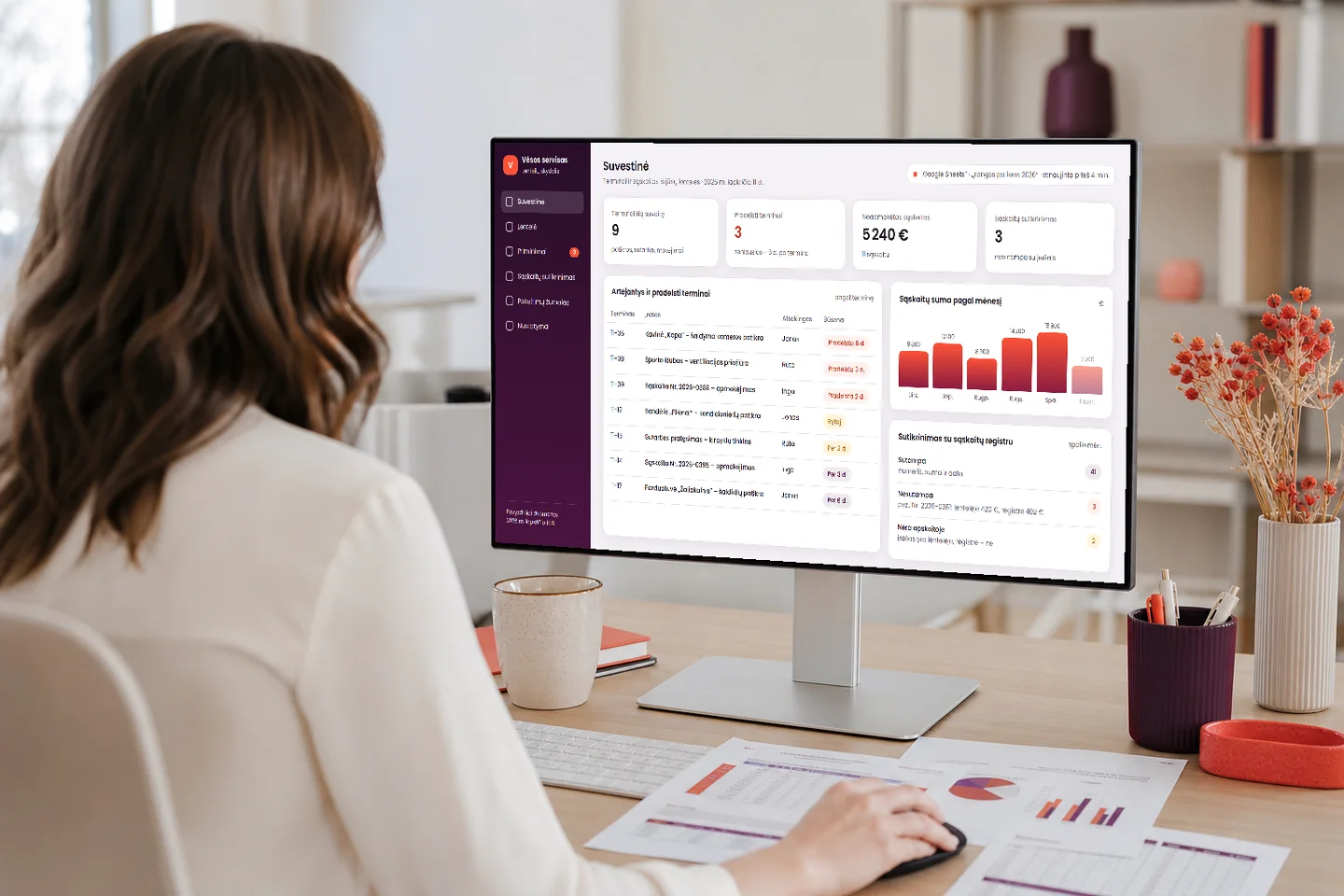
The spreadsheet your company already works in stays. We show its data on a clear dashboard: what is happening this week, what is overdue and how many invoices are unpaid. We remind you of an approaching deadline by email or Telegram, and the changes made in the spreadsheet or on the dashboard appear in a log, where you can restore them.
- The spreadsheet stays yours, and your staff work the way they are used to
- Deadlines are flagged by email and Telegram
- You can see who changed what, and restore the previous value
Price – from €990 · timeline – 1–2 weeks · no VAT charged Pricing
What you get
What you get every day
The spreadsheet stays familiar, while the dashboard does the calculating, searching and reminding for you.
Fewer deadlines remembered too late
Inspection, contract and payment dates that you now have to hunt for in a spreadsheet appear on one summary, and we remind you of an approaching deadline in advance.
See your invoices and amounts
Unpaid invoices and amounts by month are calculated automatically. We match the invoices against your register: matching, not matching or missing from the accounts.
No more forgotten client deadlines
When a deadline that matters to a client is approaching, such as an equipment inspection or the end of a contract, the person responsible gets a reminder instead of remembering when it is already too late.
What it looks like
What it looks like day to day
Two screens: a summary built from your spreadsheet, and the reminders with the change log.
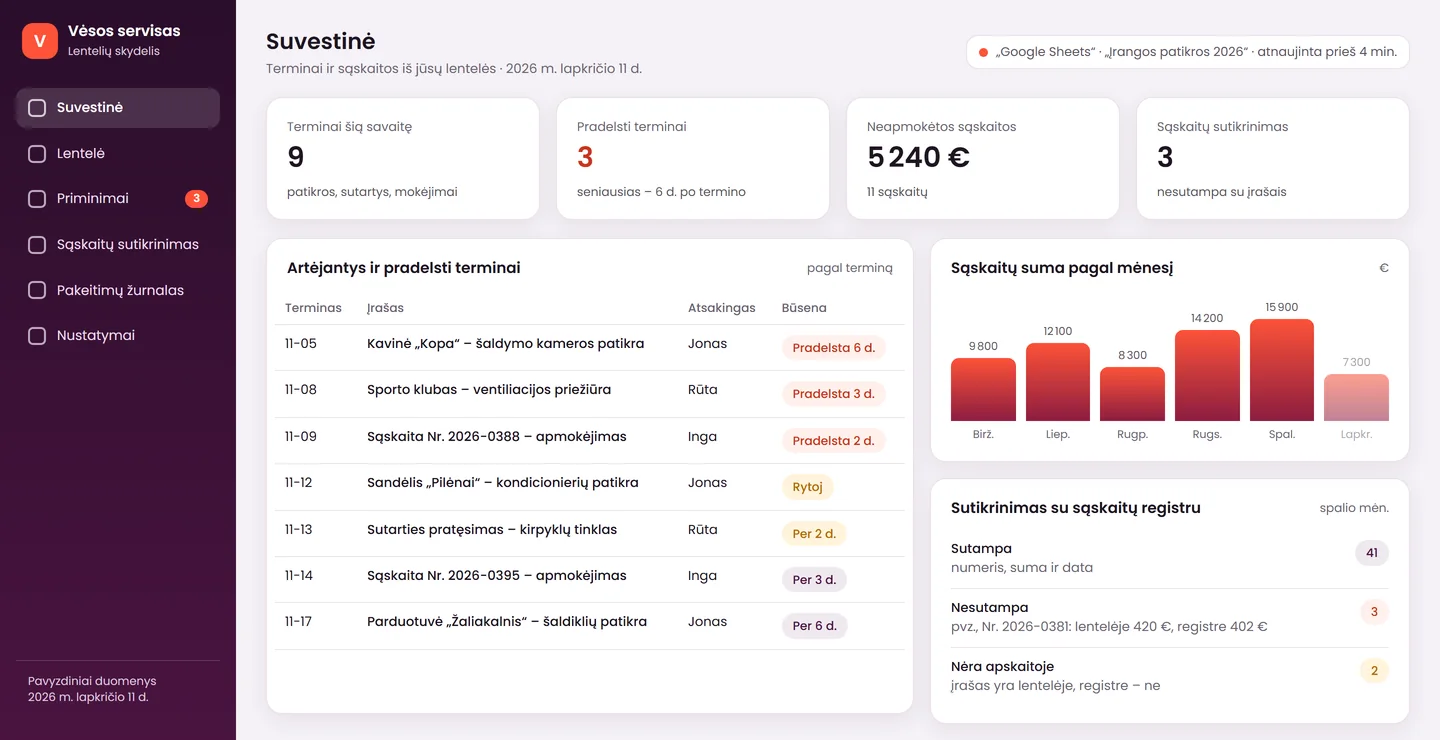
Deadlines and amounts in one summary
You see what is still due this week, what is already overdue and how many invoices are unpaid. The data is taken from your spreadsheet, so nothing has to be copied by hand.
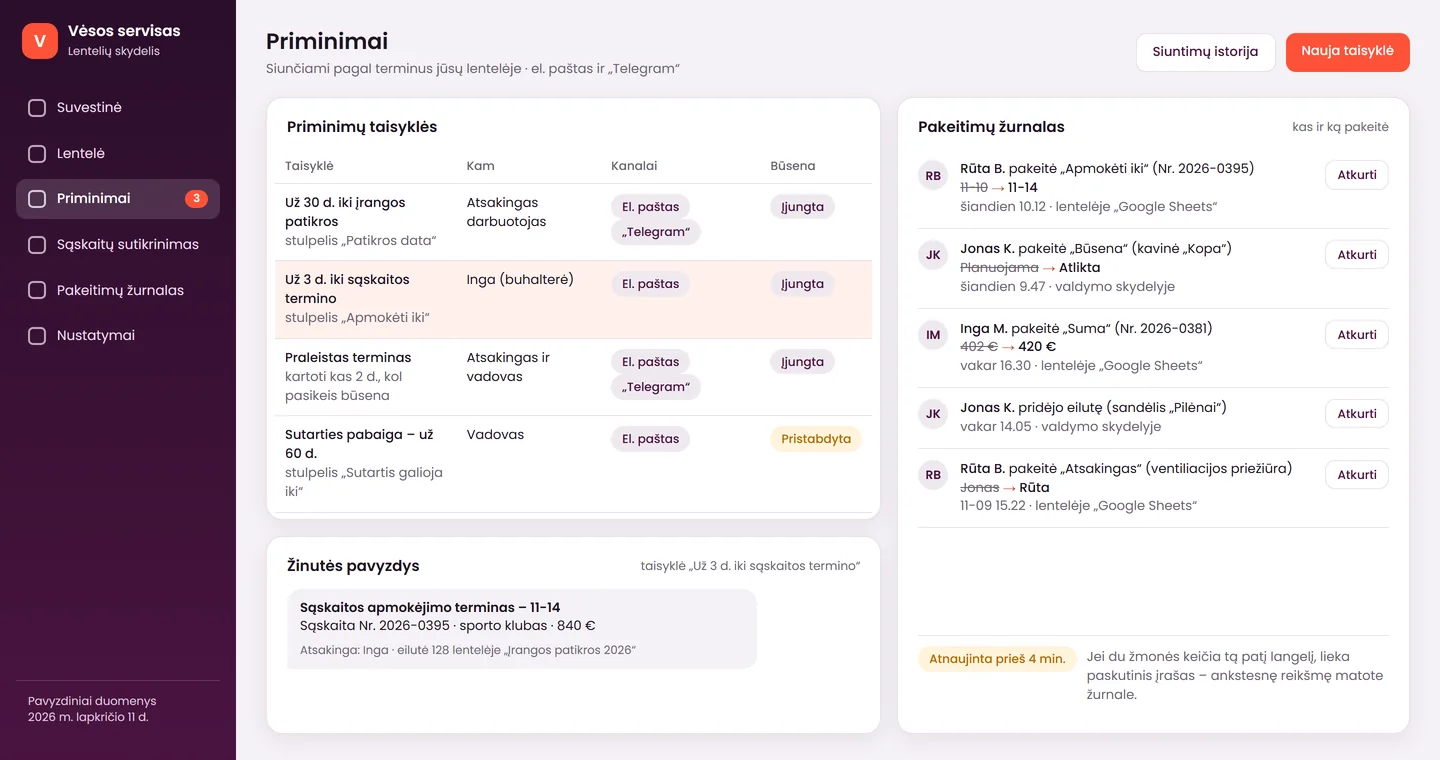
Reminders and the change log
The rules say when, to whom and through which channel to send a reminder. In the log you see who changed what in the spreadsheet or on the dashboard, and you can restore the previous value.
The screens show a product mock-up: one of the possible versions, with sample data from a fictional company, “Vėsos servisas”. The figures are not a promise of results. We adapt the dashboard and the reminder rules to each client – to their spreadsheet and their deadlines. The screens show a Lithuanian interface; yours can be in the language you need.
Advantages
How this differs from a simple schedule in a spreadsheet
Spreadsheets are convenient until you have to watch them all the time. Here the system takes over the watching.
No need to change your habits
Your staff keep filling in the same spreadsheet. The dashboard and the reminders work alongside it, not instead of it.
A log and restore
The log shows who changed a value, when and where, and you can restore a record that was deleted or damaged by accident.
Clear limits
Before work begins we write down openly which sources are suitable and what the system does when two people change the same cell.
Features
What the system can do
The main features included in the product.
Spreadsheet and dashboard
- we connect a Google Sheets spreadsheet, or a file in OneDrive or SharePoint
- the dashboard shows upcoming and overdue deadlines and amounts by month
- changes made in the spreadsheet or on the dashboard are visible in both places
- the log records who changed what and when, and a value can be restored
- if a spreadsheet is no longer enough and you need a full system, the data and the dashboard stay
Reminders and matching
- deadline reminders by email and Telegram
- rules: how many days ahead, to whom and through which channel to send
- we repeat the reminder until the deadline is marked as done
- we match invoices against your register file: matching, not matching, missing from the accounts
- WhatsApp reminders are assessed separately
Honestly
What the system does not do, and when you do not need it
It is better to know the limits in advance than to discover them after launch.
What the system does
- works with Google Sheets and with files in OneDrive or SharePoint – we can read and update them continuously
- reminds you about deadlines by email and Telegram
- records every change in a log and lets you restore it
- matches invoices against a register file and shows the discrepancies
What it does not do
- does not sync an .xlsx file that sits on your computer’s disk in “real time”: such a file can only be imported and exported
- does not resolve conflicting simultaneous changes – when two people change the same cell, the last entry remains, and you can see the previous value in the log and restore it
- does not replace accounting software: the matching shows discrepancies but does not change the accounting records
Package
Spreadsheets with reminders
A single package: we connect your spreadsheets, build the dashboard and set up the reminders.
Most popular
Spreadsheets with reminders
from€990
approximately 1–2 weeks
If your spreadsheet already holds deadlines, invoices or contracts, and you have to remind yourselves of them.
Included6
- connection of 1–2 spreadsheets (Google Sheets, or a file in OneDrive or SharePoint)
- a dashboard with upcoming and overdue deadlines and amounts
- email and Telegram reminders according to your rules
- a change log with the option to restore a value
- invoice matching against your register file
- brief training and a warranty period of 12 months for programming errors
Not included3
- WhatsApp reminders – assessed separately (paid Meta message templates)
- a direct integration with accounting software (Rivile, Centas, B1) – assessed separately
- more than 2 spreadsheets – assessed according to scope
The price is final – no VAT is charged. Work not included in the package costs €50/hour. We write the price and the deadline into the contract before work begins.
Launch
From spreadsheet to reminders
- Free assessment1–2 working days
We review your spreadsheet (a copy without personal data is enough), discuss which deadlines matter most and which place will be the main one: Google Sheets or a file in OneDrive.
- Dashboard and reminders3–7 working days
We describe the scope of work, set a fixed price, connect the spreadsheet, build the dashboard and the reminder rules, and match the invoices against the register file.
- Launch and training1 working day
Together with you we test the reminders with real deadlines, show you how to read the summary and the log, and hand over brief instructions.
Languages
The system in your language
The system and AI work in several languages, and we can prepare the dashboard interface and the reminder texts in any language you need, not only Lithuanian, Russian or English.
- dashboard labels and buttons in the language you choose
- reminder texts in the language you choose
- spreadsheet column names stay as you use them now
Together
When a spreadsheet is no longer enough
You can start with a spreadsheet and add whatever you need later.
A full client and order system
When the spreadsheet outgrows itself, it can be moved to a full system with permissions and history – the dashboard and the data stay.
Emails to clients
An email can be prepared based on the status marked in the spreadsheet – only for those who have agreed to receive it.
Tasks from meetings
Deadlines and responsible people agreed in a meeting can be moved into the spreadsheet so that they are flagged.
Data and law
Your data
Briefly and simply: who sees the spreadsheet and where it stays.
The spreadsheet stays yours
The data remains in your Google or Microsoft account. You grant access, and you can revoke it at any time.
Who sees what
On the dashboard, each user sees only the columns and rows that you allow.
Change history
The log keeps a record of who changed what. If the spreadsheet contains personal data, we agree the retention period with you; this is not legal advice.
Deletion
On request, we can delete the log and the dashboard data.
Need a solution tailored to your systems?
If you have many spreadsheets, they are complex or they need to be linked to accounting software, let us discuss the project individually.
Send us your spreadsheet – we will assess it free of charge
Tell us who fills in your spreadsheet, and how, and which deadlines you want to see. Within 1 working day we will tell you what we can do, what it will cost and how long it will take.
FAQ
Frequently asked questions
What happens when two people change the same cell?
The last entry remains – this is how most similar solutions work. That is why we save every change in the log: you can see who changed what, and restore the previous value. When many people are constantly filling in the same spreadsheet, it is worth considering a full system.
Does an Excel file on my computer work?
It works for import and export, but not for work in “real time”. A continuously updated dashboard needs a Google Sheets spreadsheet or a file in OneDrive or SharePoint. Before we start, we check where your file is kept and tell you how best to move it.
Can reminders be sent via WhatsApp or Telegram?
The package includes email and Telegram. WhatsApp is assessed separately, because it needs approved message templates, and Meta charges fees for them. Write to us and we will estimate the price and the timeline.
How is this different from Looker Studio or Power BI?
Programs like those mainly show charts, whereas in this solution the most important things are deadlines and matching: what is approaching, what is overdue and whether the invoices match. We adapt the reminders, the change log and the restore function to your spreadsheet. If all you need is charts, simpler tools will do – we will tell you that straight away.
When is it worth moving from spreadsheets to a full system?
When many people are constantly filling in the spreadsheet, users need different permissions or the spreadsheet has become too complex. We then move the spreadsheet into the client and order management system, and the dashboard and the data stay.
Enquiry
Get a proposal within 1 working day
Tell us which spreadsheets you use and which deadlines you do not want to miss. You can email us an example of the spreadsheet without personal data. Tel. +370 670 99265.
+370 670 99265Mon–Fri 9:00–18:00
info@saitai.ltWe reply within 1 working day
Alaušo g. 1C, LT-08424 VilniusMeetings by prior arrangement by phone only