Skip to content

E-commerce search optimisation for Google and AI agents

We program and tidy up your online store's catalogue so that Google and AI search tools can make sense of it: a category structure built around what shoppers search for, filters that don't create duplicates, Product and Offer structured data, a product feed for Google Merchant Center, and structured product data that AI search and agents can read. We work with WooCommerce, VirtueMart and custom Laravel stores, and make the technical changes ourselves. A store audit costs from €99, one-off optimisation from €119 and ongoing work from €119/month.

Prepared by the Saitai.lt team · Updated 23 October 2026

A good fit if

  • Your store has hundreds or thousands of products, yet visitors from Google mostly arrive by searching for the store's name.
  • Google Search Console reports thousands of unindexed or duplicate pages, even though you have far fewer products.
  • Product descriptions come from a manufacturer's or supplier's XML file, so dozens of other stores carry exactly the same text.
  • Category pages show only a product grid with no text, and competitors or price comparison sites rank for category searches.
  • You're planning to move the store to another platform and don't want to lose your search traffic.
  • You want your product data – names, prices, stock – to be clean for Google's product listings and readable by AI search tools.

Not the best fit if

  • Your store has a few dozen products and little competition. An audit and one-off optimisation are usually enough, without ongoing work.
  • Your prices or delivery terms are noticeably worse than competitors'. Optimisation brings visitors, but they'll buy where it's cheaper or faster, so it's worth reviewing your offer first.
  • You need sales within a few weeks. Changes in search for an online store usually show after 3–6 months.
  • The store runs on a closed platform where templates, URLs or server settings can't be changed. We can still audit it and give recommendations, but what we can fix is limited.
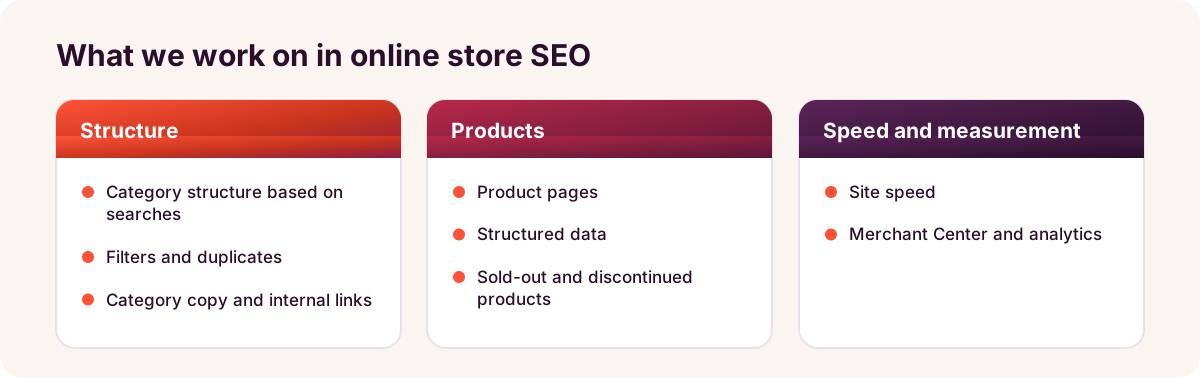
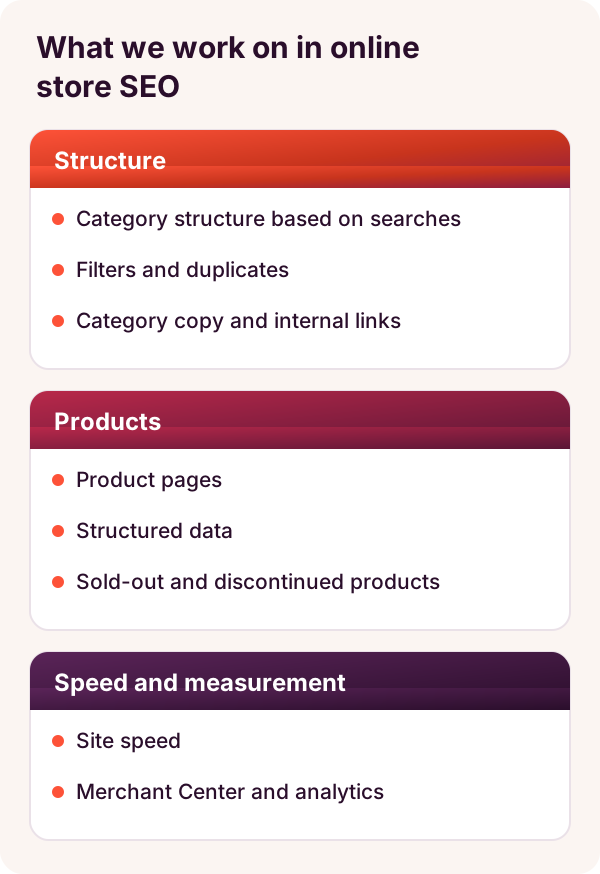
E-commerce search optimisation diagram: structure (categories, filters and duplicates, texts and internal links), products (product pages, structured data, out-of-stock products), speed, Merchant Center and analytics E-commerce search optimisation diagram: structure (categories, filters and duplicates, texts and internal links), products (product pages, structured data, out-of-stock products), speed, Merchant Center and analytics

Included

What you get

Category structure based on searches

We organise categories and subcategories around how shoppers actually search (e.g. "kids' bikes 20 inch"). Where a popular search has no matching page, we create a dedicated category.

Filters without duplicates

We decide which filter, sorting and pagination URLs get indexed and which don't (canonical URLs, noindex, robots.txt), so search crawlers don't waste time on thousands of filter combinations and find new products sooner.

Product pages

We create a product naming template (brand, model, key feature), write unique descriptions for best-sellers and set up variants (colour, size) so they don't create duplicate pages.

Category copy and internal links

Each category gets a short text that answers shoppers' questions, plus links to related categories and popular products. We agree the amount of copy based on your range.

Product and Offer markup

We add Product, Offer (price and stock) and BreadcrumbList structured data. Star ratings are shown only when they're backed by genuine customer reviews.

Google Merchant Center product feed

We sort out the product feed in your Google Merchant Center account so products can appear in Google's free product listings, and keep it in line with your store's prices and stock.

Product data for AI search and agents

Specifications, prices, stock and delivery terms are published as structured product data that AI search and agents can read. Whether AI tools show your products is up to them – we put right everything that depends on your store.

Out-of-stock products and analytics

Temporarily unavailable products stay on the site with a stock notice; discontinued ones are redirected (301) to the closest product or category. We set up GA4 e-commerce events so you can see which categories bring sales from search.

Price

How much does e-commerce search optimisation cost?

You can start with a store audit for from €99: you get a list of issues and a prioritised work plan. One-off optimisation costs from €119, and ongoing work from €119/month. The exact price depends on the number of products and the technical state of the store.

Price from

€119/month

Get a quote

Prices include all taxes – no VAT is charged (we are not VAT-registered). The final price depends on the project: we put it in the contract before work begins.

What the price depends on

  • The number of products, categories and product variants.
  • How many filters and sorting options the store has, and how many duplicates have already made it into Google's index.
  • The platform, theme and plugins: WooCommerce, VirtueMart or a custom Laravel system.
  • The state of product descriptions: manufacturer copy, or none at all.
  • The number of language versions and the competition in your product category.
  • Whether the product feed in Google Merchant Center needs sorting out.

Additional costs

  • Category and product copy – from €29/page; if you need a large number of product descriptions, we quote for them separately.
  • Larger programming jobs (e.g. reworking a template, a new filter module, changes to product import) – €30/hour or a separate quote.
  • Paid plugin licences – only with your agreement and at the vendor's prices.
  • The audit fee is credited if you order ongoing optimisation within 1 month of the audit.

Timeline

How soon will you see results in search?

Technical issues – filters, duplicates, redirects – are usually fixed within 2–4 weeks, but Google recrawls thousands of store pages gradually. Changes in traffic and sales from search usually show after 3–6 months, or 6–12 months in highly competitive product categories. We don't guarantee rankings – competitors affect them too.

PeriodWhat we doWhat you'll see
1 weekaudit, category and keyword map, work plana list of issues and priorities
2–4 weeksfilters, duplicates, redirects, structured datafewer unindexed and duplicate pages in Search Console reports
2–4 monthscategory copy, product naming templates, internal links, product feedsmore impressions for category and product searches
4–6 months and beyondcontent expansion, best-seller descriptions, buying guideschanges in clicks and sales from search in GA4 reports

Process

How we work

  1. Free initial assessment1–2 working days

    We look at the store and your 3–5 main product categories, point out the biggest problems and tell you whether optimisation is likely to pay off in your case.

  2. Audit and category map3–5 working days

    We check indexing, filters and templates, map keywords to categories and draw up a work plan.

  3. Technical fixes2–4 weeks

    We program fixes for filters, duplicates, redirects and structured data directly in the store, or prepare a brief for your developer.

  4. Categories and productsmonthly

    We write category copy, tidy up product names and descriptions, and build internal links.

  5. Feeds and analytics3–5 working days

    We set up the Google Merchant Center product feed and structured product data for AI tools, and check that GA4 records purchases correctly.

  6. Report and planmonthly

    With ongoing work, we send a monthly report: work completed, plus impressions, clicks and sales from search by category.

Comparison

Category, product or filter page: what brings shoppers from search?

Page typeWhich searches it matchesWhat we optimiseWhen it's a priority
Categorybroad: "kids' bikes", "work boots"title, short text, internal links, filter settingsalmost always – categories usually bring the most visitors
Productspecific: model, brand, product codenaming template, description, photos, Product markupwhen shoppers search for specific models or product codes
Filter pagecombination: brand and category, colour or sizeonly combinations people actually search for; the rest aren't indexedwhen a combination gets many searches and has no category of its own
Buying guide or articleinformational: "how to choose…", "what's the difference…"structure, table, links to categorieswhen shoppers compare before buying and ask AI assistants
Home pagestore name, general product areatitle, links to main categoriesrarely – it already gets the most links

Examples

Typical scenarios

These examples show how it works. They are not specific client cases.

Products from a supplier's XML file

Situation
For example, a store imports 3,000 products from a supplier's XML file every night. The names and descriptions are identical to those in several other stores, so Google shows other sites instead.
Solution
A product naming template based on real searches, unique descriptions for the 50–100 best-sellers, and category copy. The import is reprogrammed so it doesn't overwrite fields edited by hand.
Outcome
Key products with unique content that survives every import, plus a clear plan for the remaining categories.

Seasonal products and 404 errors

Situation
For example, a store changes its collections every year and simply deletes old product pages. Search Console shows hundreds of 404 errors, and external links to old products lead to dead pages.
Solution
Rules for out-of-stock and discontinued products: temporarily unavailable ones stay with a notice, discontinued ones are redirected to a new model or category, and permanent seasonal categories are never deleted.
Outcome
Fewer errors, preserved link value and categories that don't start from scratch in search every season.

Moving from VirtueMart to WooCommerce

Situation
For example, a store is moving from an old version of VirtueMart to WooCommerce, and category and product URLs are changing.
Solution
A table of old and new URLs for every category and product, 301 redirects, migrated names and descriptions, Product markup and an updated Merchant Center feed.
Outcome
A move with no lost pages, plus monitoring of search errors in the first months after launch.

Send us your store address – we'll review it for free

Tell us your 3–5 main product categories. Within 1–2 working days, we'll tell you what's holding your store back in search the most and where to start.

Get an assessment

FAQ

Frequently asked questions

Do I need a unique description for every product?

Not always. Unique descriptions matter most for best-sellers, high-value products and categories; for the rest, a good naming template and well-filled attributes are often enough. Large volumes can be drafted with AI, but we check dimensions, materials and other facts against the supplier's data.

Should filter pages be indexed?

Usually not. We index only the filter combinations people actually search for (e.g. brand plus category). Other combinations – colours, price ranges, sorting – are kept out of the index so Google doesn't waste time on thousands of near-identical pages and finds new products sooner.

What should I do with out-of-stock products?

It depends on whether the product will be back. A temporarily unavailable product stays on the site with a stock notice or alternatives, because its page already appears in search. A permanently discontinued product is redirected (301) to a new model or the closest category. Deleting a page without a redirect only makes sense if it had no visitors and no links.

Why do I need a product feed for Google Merchant Center?

Google takes product names, prices, stock and images for its free product listings from this feed. If the feed doesn't match the store (a different price, an item out of stock), products get rejected. We generate the feed automatically from your store data so it always reflects real prices and stock.

Which is better for search – WooCommerce or a custom store?

Both can be optimised well. WooCommerce has ready-made plugins, so most settings are quick to configure. In a custom Laravel store we program everything ourselves, so URLs, filters and templates can be tailored exactly to your range. We optimise VirtueMart too; some settings just take more manual work.

Can you optimise a store built by another company?

Yes. We'll need access to the store's admin panel, the server (FTP or hosting control panel) and Google Search Console. We make the fixes ourselves or, if another developer looks after the store, prepare tasks for them with example URLs.

Does an online store need to prepare for AI search and AI agents?

It's worth it. Shoppers increasingly ask ChatGPT or Perplexity which product to choose, and AI tools favour sources with clear specifications, prices, comparison tables and buying guides. We set up structured product data as part of optimisation, and offer broader work on AI search as GEO (from €349/month). We don't promise a place in AI answers – that's decided by the AI tools themselves.

More

Related services

Enquiry

Get a free store assessment

Give us your store address, platform and approximate number of products. Tel. +370 670 99265.

+370 670 99265Mon–Fri 9:00–18:00

info@saitai.ltWe reply within 1 working day

Alaušo g. 1C, LT-08424 VilniusMeetings by prior arrangement by phone only

Enter a number

— required field. We use your data only to reply to your request.