

Payment gateway integration: Paysera, Montonio, Stripe
Payment gateway integration connects a payment provider to your online store, so customers can pay by bank link, card or mobile wallet, and the order status changes automatically once payment is made. Saitai.lt sets up Paysera (a Lithuanian payment service), Montonio (a Baltic payment platform), Stripe and PayPal in WooCommerce, VirtueMart and custom online stores. Prices start at €150, with a timeline of 2–5 working days.
In short
- Price
- from €150 per payment provider; no VAT is added
- Timeline
- 2–5 working days from receiving the deposit and the provider's login details
- Providers
- Paysera, Montonio, Stripe, PayPal
- Payment methods
- bank links (payment straight from the customer's online bank), payment cards, Apple Pay, Google Pay and other methods the provider offers
- Platforms
- WooCommerce, VirtueMart, custom online store (Laravel)
- Warranty
- 12 months
- Payment
- 50% deposit, balance when the integration goes live
- Where we work
- remotely, all over Lithuania; meetings in Vilnius by appointment, arranged by phone
Who it’s for
- Your online store only accepts bank transfers, and your sales manager checks the bank statement every day and marks paid orders by hand.
- Customers abandon their basket because they can't pay by card or through their own bank's link.
- You sell to customers abroad who are used to paying by card, Apple Pay or PayPal.
- Your current payment module is no longer updated, shows errors or changes the order status incorrectly.
- You want to switch payment provider or add a second one without changing your store.
- You are building a new online store and want to test payments before launch, not with your first customers.
When it’s not the right fit
- You only sell to businesses on deferred payment against an invoice. Then sending a pro forma invoice or invoice matters more than taking payment at checkout.
- You use WooCommerce, and simply installing the provider's official plugin with the default settings is enough. You can do that yourself by following the provider's instructions.
- You haven't yet signed a contract with a payment provider. The integration can be prepared in test mode, but you'll only be able to accept real payments once the provider has approved your account.
Included
What you get
Choosing a provider
We help you choose a provider based on your customers: for customers in Lithuania, bank links matter most; for customers abroad, payment cards and mobile wallets.
Module installation and settings
We install the official module or another reliable, maintained one, enter the access keys, and set the currency, the payment methods shown and their order at checkout.
Automatic order status
Once the provider confirms the payment, the order is marked as paid and the customer gets a confirmation, while failed or cancelled payments are clearly visible in the admin area.
Matching your design
We adapt the list of payment methods, with bank and card logos, to your store's design and to phone screens.
Refunds from the admin area
If the provider's module supports it, you refund the customer straight from the order, without logging in to the provider's self-service portal.
Testing in test mode
In the provider's test mode, we try out a successful, failed and cancelled payment and a refund, and after launch we make one real test payment.
Guide and a 12-month warranty
We show you where to see payment statuses and how to issue refunds. For 12 months, we fix integration bugs free of charge.
Price
How much does a payment gateway integration cost?
Price from
€150
Integrating one payment provider with your online store costs from €150: the price covers module installation, settings, matching your design and testing in test mode. When we build a new online store, payments are included in the package (one provider in the Start package, two in Business), and each additional integration costs from €150.
Prices include all taxes – no VAT is added (we are not VAT-registered). The final price depends on the project: we put it and the timeline in the contract before work starts.
What the price depends on
- How many payment providers and payment methods need connecting.
- Whether there is an official provider module for your platform, or the integration has to be built using the provider's API (in a custom online store).
- Whether the basket or payment step design needs changing.
- Whether you need refunds, partial refunds or card pre-authorisation from the admin area.
- Whether you sell in several currencies or several countries.
- Whether payment data also has to be passed to your accounting software.
Additional costs
- The payment provider's transaction fees – under your contract with the provider; you pay them directly to the provider.
- You sign the contract with the provider yourself, and account approval can take a few days, so it's worth applying in advance.
- Integration maintenance after the warranty, for example adapting it when the provider changes its API – under a maintenance agreement, agreed separately.
Timeline
How long does a payment gateway integration take?
A payment provider integration takes 2–5 working days from receiving the deposit and the provider's login details. For a custom online store, where there is no module and the integration is built using the provider's API, we give the timeline after assessment.
| Scope | Example | Timeline |
|---|---|---|
| One provider with an official module | Paysera or Montonio bank links and cards in a WooCommerce store | 2–3 working days |
| Two providers or extra settings | Montonio for customers in Lithuania and Stripe or PayPal for customers abroad, different methods by country | 3–5 working days |
| Custom online store | integration built using the provider's API (Laravel) | after assessment |
Process
How it works
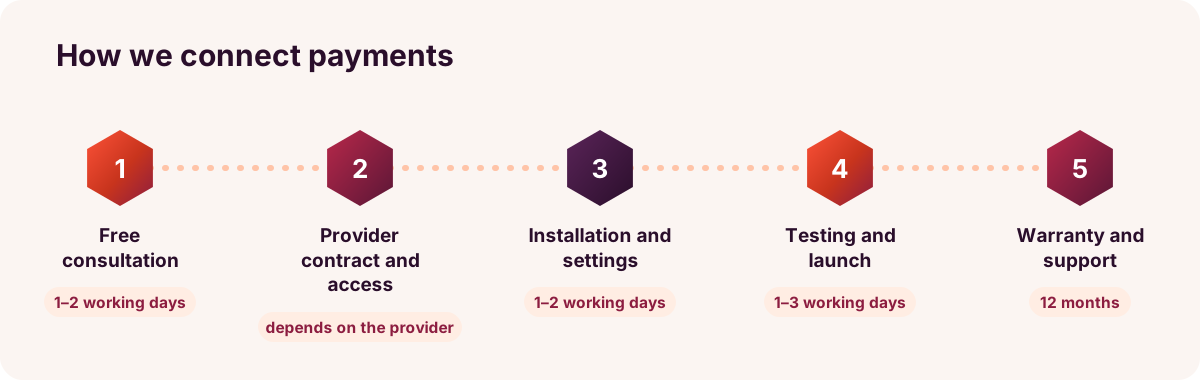
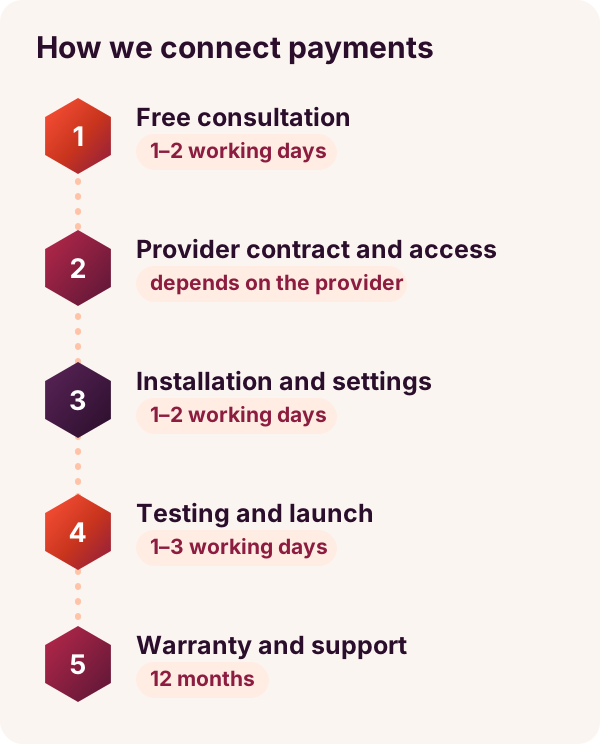
- Free consultation1–2 working days
We discuss who your customers are, which payment methods they use, and which provider you already have, or plan to have, a contract with.
- Provider contract and accessdepends on the provider
You sign the contract with the provider, and we explain which access keys will be needed. We start work once we receive the 50% deposit.
- Installation and settings1–2 working days
We install the module and set up payment methods, order statuses and customer emails.
- Testing and launch1–3 working days
In test mode, we try out a successful, failed and cancelled payment and a refund on desktop and mobile, then switch on real payments and make a test purchase.
- Warranty and maintenance12 months
For 12 months, we fix integration bugs free of charge, and after that we keep the module updated under a maintenance agreement.
Comparison
Paysera, Montonio, Stripe or PayPal: which provider should you choose?
| Provider | Most common payment methods | Usually best for |
|---|---|---|
| Paysera | bank links in Lithuania and other countries, payment cards | online stores whose customers are mostly in Lithuania |
| Montonio | bank links across the Baltic states, payment cards, Apple Pay, Google Pay | online stores selling in Lithuania, Latvia and Estonia |
| Stripe | payment cards, Apple Pay, Google Pay, recurring payments | selling to customers abroad or offering subscriptions |
| PayPal | PayPal account and payment cards | customers abroad who are used to paying with PayPal |
| Several providers together | local bank links plus cards or PayPal | when you have customers both in Lithuania and abroad |
Examples
Typical projects
A store that only accepts bank transfers
- Situation
- For example, a home textiles online store only accepts bank transfers. The sales manager matches the bank statement against orders every day, and some customers never pay at all.
- Solution
- Montonio or Paysera bank links and cards at checkout: once the customer pays, the order is automatically marked as paid, and bank transfer is kept for businesses.
- Result
- Fewer unpaid orders and no more checking bank statements by hand.
A store selling to customers abroad
- Situation
- For example, a linen goods store is getting more and more orders from Germany and the USA, but customers abroad don't use Lithuanian bank links.
- Solution
- Alongside Paysera bank links, Stripe card payments, Apple Pay, Google Pay and PayPal are added, and payment methods are shown according to the customer's country.
- Result
- Convenient payment for customers abroad, without a separate store for each country.
Service bookings with a deposit
- Situation
- For example, a massage studio takes bookings on its website, but some clients don't turn up, and the booked time goes to waste.
- Solution
- A deposit is taken by Paysera or Stripe payment when booking, and the booking is confirmed only once payment is received.
- Result
- Fewer no-shows and deposits without manual checking.
Tell us which payments you want to accept
Let us know your online store platform and the provider you have, or plan to have, a contract with. Within 1 working day, we'll tell you how much the integration would cost and when payments could be up and running.
FAQ
Frequently asked questions
Yes. You sign the contract with Paysera, Montonio, Stripe or PayPal yourself, because the money goes into your account. The provider checks your company and website – for example, your terms of sale, contact details and return policy – and once approved, issues the access keys. We can prepare the integration in test mode even before approval.
More
Related services
Shipping integration: Omniva, DPD, LP Express
Parcel lockers at checkout and shipping labels from your online store – from €150.
Accounting software integration with your online store
Paid orders reach your accounting software without re-keying – from €490.
How much does an online store cost?
Packages from €999: how many payment providers and couriers are already included.
Integrations for online stores and business systems
All online store integrations: accounting, shipping, suppliers and APIs.
Enquiry
Get a payment integration quote within 1 working day
Tell us which platform your online store runs on and which payment methods you want to offer your customers. Tel. +370 670 99265.
Phone / WhatsApp / Viber:
+370 670 99265
Email:
info@saitai.lt
We reply within 1 working day. Meetings in Vilnius are by appointment only – please call first.

