

Ready-made product
Client and order management system for a small business
Clients, orders, invoices, expenses and reminders in one system (often called a CRM) instead of Excel spreadsheets, emails and several separate programs. AI prepares draft emails and invoices, and a member of staff approves them. There is no fee per user, and the system code and your data stay with you.
- The full client history, orders and invoices on a single card
- AI prepares a draft, and nothing is sent until you approve it
- The price does not rise as your team grows
Price – from €990 · Business package – from €1,499 · no VAT charged Pricing
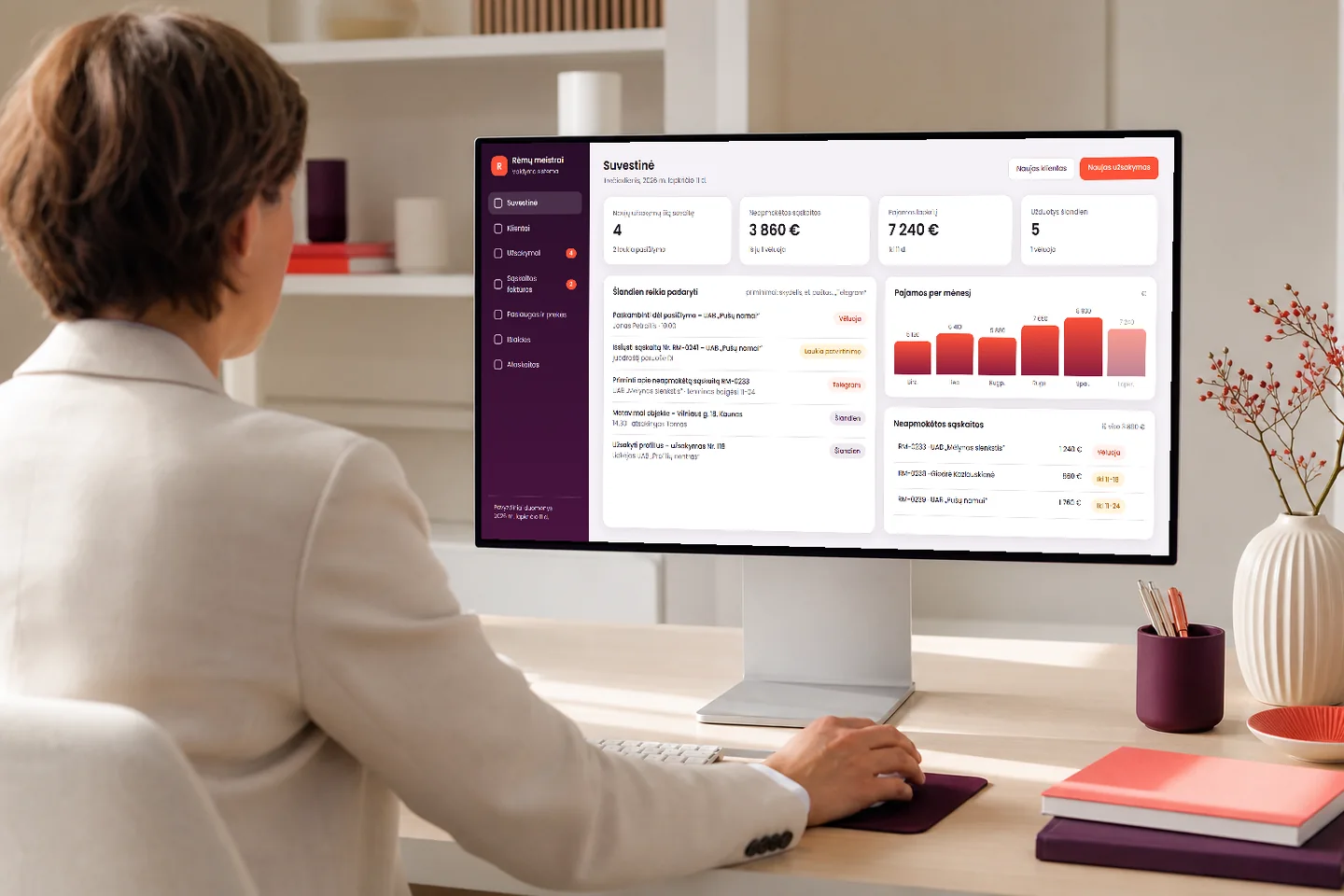
What you get
What you get every day
In the morning you open one window and see what needs doing today, what is waiting for a reply and who has not yet paid.
Less searching and retyping
You enter a client’s details once. The order, the invoice and the draft email are created from them, so there is no copying between spreadsheets, emails and programs.
See what is still unpaid
Unpaid and overdue invoices appear on the dashboard, and the system sends reminders in good time. There is no fee per user, so costs do not grow as the team does.
Nothing gets forgotten
A promised call, quotation or invoice is flagged on the dashboard, by email or via Telegram. If a member of staff leaves, the client’s history stays on the card.
What it looks like
What it looks like in day-to-day work
Three screens: the dashboard, a client card, and an invoice that AI has prepared and that is waiting for your approval.
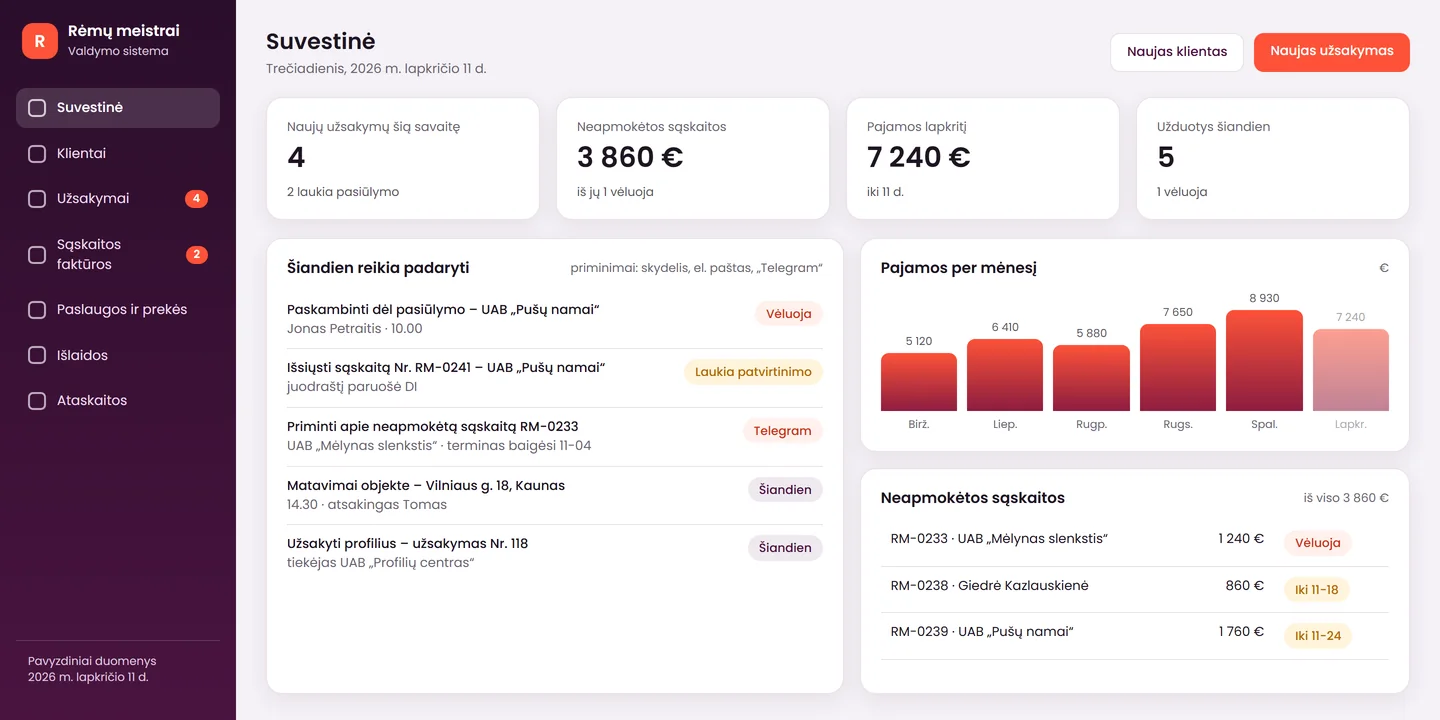
Dashboard: what needs doing today
Today’s tasks and reminders, new orders, income by month and unpaid invoices. You start the working day from a single screen.
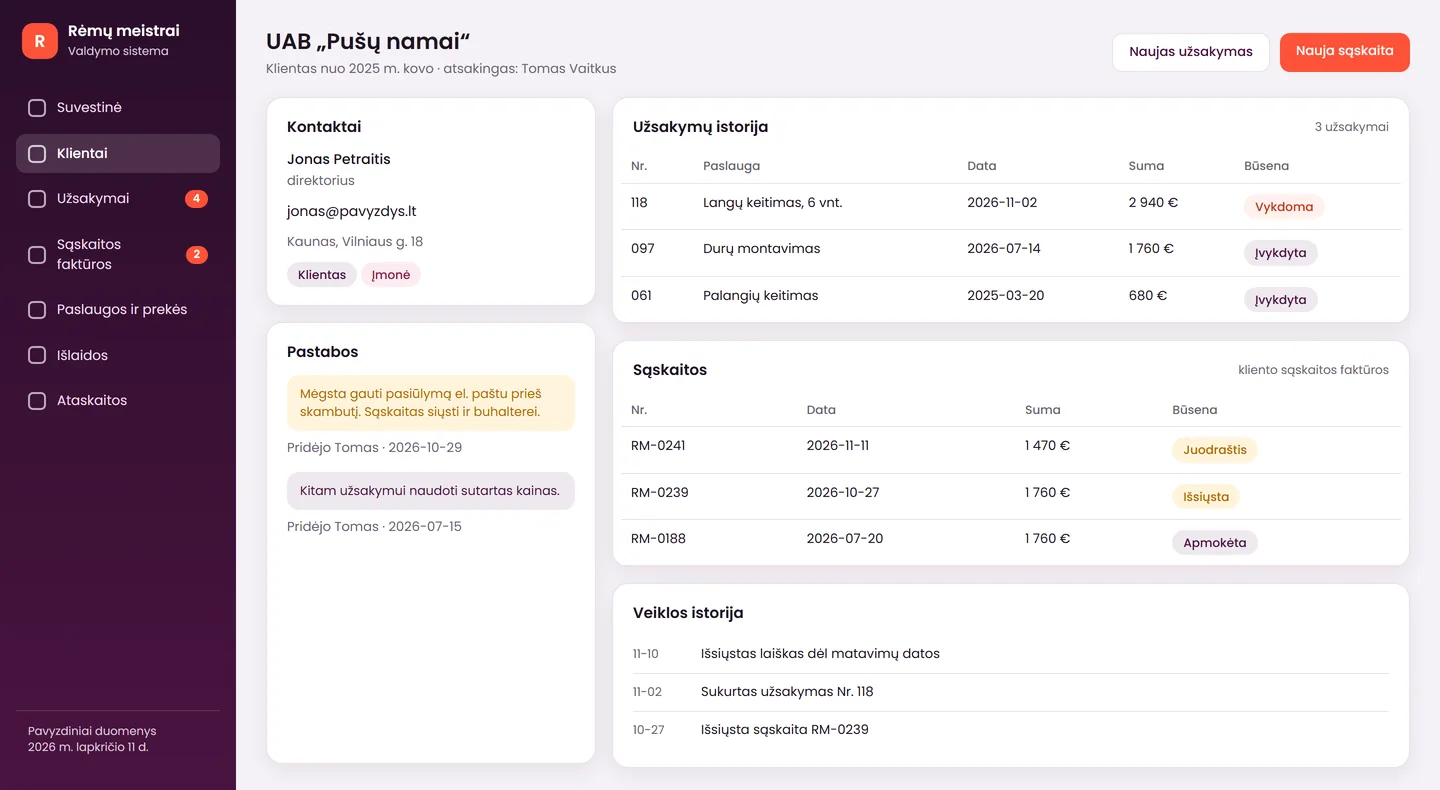
A client card with the full history
Contact details, order history, invoices and notes in one place. A new member of staff can see within minutes what has already been agreed with the client.
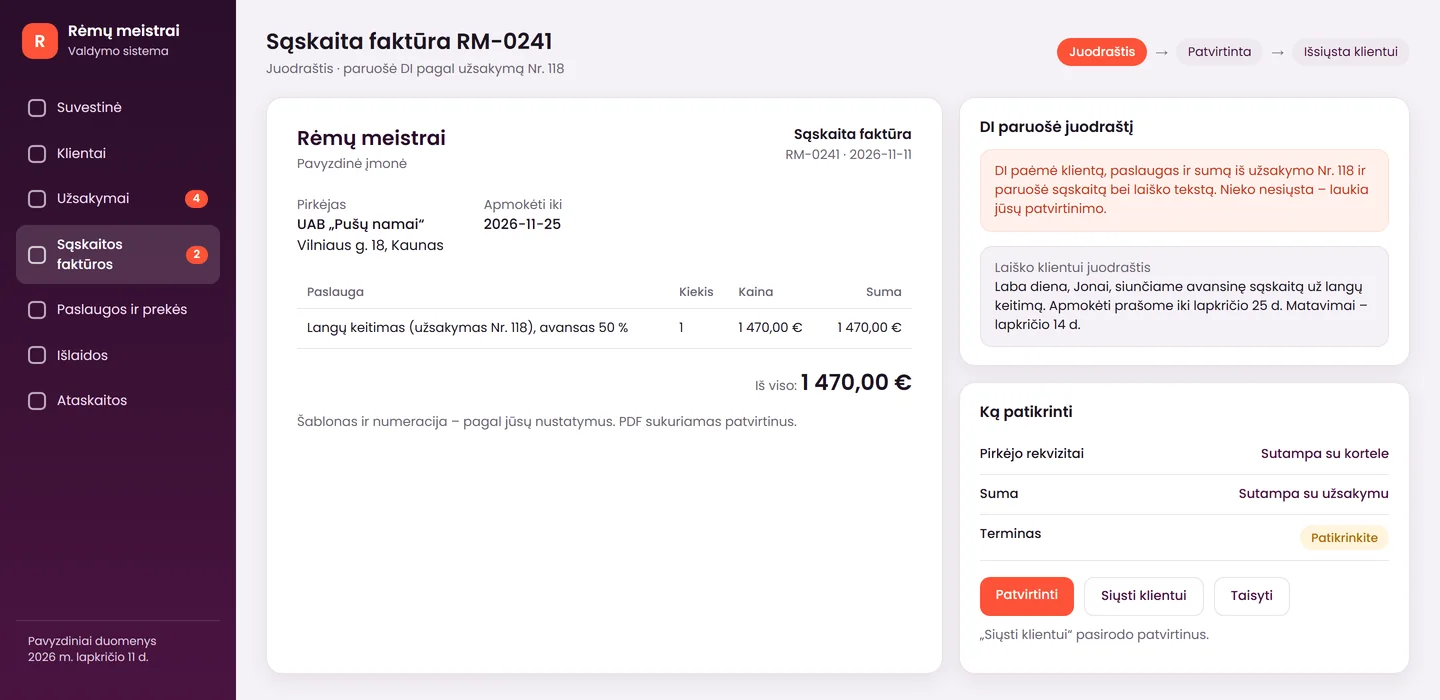
Invoice: draft, approval, sending
AI takes the client’s details and the amount from the order and prepares the invoice and the text of the email. You check it and click “Approve”, and only then can it be sent to the client.
The screens show a product mock-up: one of the possible versions, with sample data from a fictional company, “Rėmų meistrai”. The figures are not a promise of results. We adapt the system to each client’s processes, fields and templates. The screens show a Lithuanian interface; yours can be in the language you need.
Advantages
How this system differs from the usual programs
Many programs solve only one thing: either clients or invoices. Here everything is linked in one place.
Everything is linked
The client, order, invoice, expense and reminder are connected records. When you change the data in one place, there is nothing to retype elsewhere.
The price does not depend on users
You pay for the system, not for each employee. You can add a colleague or an accountant without an additional licence.
The code and data stay with you
When the project is complete, we hand over the system code, and you can export your data at any time. You do not depend on us.
A server in the EU, or your own
We host the system on a separate server in the European Union, or install it on your own server.
AI prepares, a person approves
AI prepares a draft email or invoice, and it is sent only once approved. Nothing is sent on your behalf without you.
Training is part of the set-up
We train your staff to use the system at launch, not after it. Each role is shown its own part.
Features
What the system can do
The main features included in the product.
Clients and orders
- a register of clients and suppliers: contact details, notes, activity history
- orders with statuses, linked to the client
- a list of services and goods with prices
- search, filters, export to Excel and PDF
- transfer of old data from Excel or CSV
Invoices and expenses
- an invoice in your own template and numbering
- three steps: draft, approval, sending to the client
- you can see what has been paid, what is pending and what is overdue
- income and expense records
- a data file for your accountant, including an i.SAF export (Growth package)
Reminders and reports
- tasks and reminders on the dashboard, by email and via Telegram
- WhatsApp reminders – assessed separately (a Meta business account is required)
- income by month, unpaid invoices, order statuses
- roles and permissions: a manager, an accountant and a director each see their own part
- change history and backups
AI drafts (Growth package)
- AI prepares a draft email to the client and a draft invoice
- it always shows what has been prepared and waits for your approval
- it can read an incoming email and suggest a draft order
- a member of staff reviews everything before it is sent
Honestly
What the system does not do, and who it is not for
It is better to know the limits in advance than to discover them after launch.
What the system does
- keeps clients, orders, invoices and expenses in one place
- prepares invoices in your template and reminds you about unpaid ones
- shows a dashboard and reports for the manager
- prepares a data file for your accountant
- AI prepares drafts, and a person approves them
What it does not do, and who it is not for
- does not replace accounting software: we do not keep VAT registers, payroll or full bookkeeping. Which file or i.SAF data to submit to the State Tax Inspectorate (VMI) is decided by your accountant; this is not legal advice
- does not send invoices or emails without your approval
- is not suitable if you work alone or as a pair with a standard process: a well-organised spreadsheet or a ready-made service is then enough
- is not suitable if you need the system “in a single day”: the adaptation takes a few hours of your time
- does not have a ready-made integration with every accounting program: we assess each connection separately
Value
How to work out whether you need it
We do not promise percentages that we cannot confirm. Instead, work out with your own figures how much time searching and retyping currently take.
| Employees who work with clients and invoices | example: 5 |
|---|---|
| Minutes per day spent searching and duplicating | example: 30 min. |
| Working days per month | example: 21 |
| Hourly cost of an employee | your figure |
| Monthly cost of routine work | employees × hours per day × working days × hourly cost |
| Annual fees for your current programs | users × monthly price × 12 (your figures) |
The figures you get show how much time and money routine work currently costs you and how much you pay for your existing programs. How much exactly you will save will be shown by the first month. Compare them with the price of the system and the server costs.
Packages
Start, Business and Growth packages: where to begin
You can begin with your own spreadsheets and add invoices, reminders and AI later. Choose according to how much you already work in spreadsheets.
Start
from€990
approximately 1–2 weeks
If your data is already in Excel spreadsheets and several people need to work with it comfortably.
Included5
- transfer of 1–2 of your spreadsheets to an online system
- up to 5 users, roles and permissions
- search, filters, reports
- export to Excel and PDF
- training and a warranty period of 12 months
Not included2
- invoice template and sending
- reminders and AI drafts
Most popular
Business
from€1,499
approximately 2–5 weeks
If you want clients, orders, invoices and reminders in one system.
Included5
- a register of clients and suppliers, orders, services and goods
- invoices in your own template: draft, approval, sending
- expenses, reminders and reports
- roles, change history, backups
- data transfer, training and a warranty period of 12 months
Not included2
- AI drafts and a link to accounting software
- WhatsApp reminders – assessed separately
Growth
after assessment
after assessment
If you want AI drafts and a link to your accounting software.
- everything included in Business
- AI drafts for emails and invoices, approved by a person
- a link to your accounting software, if it has an API or import
- i.SAF data export for your accountant
Prices are final – no VAT is charged. The system needs a server: a separate server in the EU (hosting, updates, backups) costs from €29/month, or, if you have your own server, we install it there. There are no per-user fees.
After launch
What happens after launch
The system is built around your processes, and processes change. That is why, after launch, you can choose who looks after the server and the changes.
Server
from €29/month
A separate server in the EU with maintenance: updates, a security certificate and daily backups. The final price depends on the server’s capacity and the scope of the system.
Changes
€50/hour
New fields, reports, templates or integrations after the warranty, or outside the scope of the warranty. We estimate the hours in advance.
Support
€129/month
If you use AI drafts: a monthly check of the answers, a monthly report and up to 2 hours of changes.
Warranty: 12 months. We fix programming errors free of charge. We work on working days (Mon–Fri).
Launch
From the first conversation to a working system
- Free assessment1–2 working days
We discuss how an enquiry, an order and an invoice currently travel through your business, who does what and where you keep your data. Show us your spreadsheets and your invoice template.
- Specification and fixed price1–3 working days
We describe the modules, the roles and what is not included in the first version. The price and timeline go into the contract, and we start work once we receive a 50% advance payment.
- Screen prototype2–3 working days
We show you the main screens with examples of your data and agree them with you before programming begins.
- Programming and data transfer1–3 weeks
We build the modules in stages and show you what has been done. We transfer your clients and history and check the number of records and the totals.
- Training and launch1–2 working days
We show the users of each role how to work, and hand over the instructions and the code. From the agreed day, clients, orders and invoices are handled only in the system.
Languages
The system and AI work in your languages
The system and AI work in several languages. We can prepare the interface in any language you need, not only Lithuanian, Russian or English.
- invoices and emails to clients in their language
- an interface in the language you choose
- AI drafts in the language the client writes in
Together
What else can connect to the system
You can start with the system and add whatever you need later.
Your spreadsheets in the system
Excel and Google Sheets spreadsheets are visible in the system straight away, without changing your habits.
Emails to clients
Emails are sent to clients from the register, and the reply appears on the client’s card.
Enquiries from your website
Website enquiries and chats arrive in the system as new clients with a task.
Tasks from conversations
Meeting summaries become tasks on the client’s card.
Data and law
Your data and your clients’ data
Briefly and simply: where it is stored and who can see it.
Where it is stored
The data is stored on a separate server in the European Union, or on your own server.
Who sees what
Roles and permissions: a manager sees their own clients, an accountant sees the invoices, and the director sees everything. The change history shows who changed what.
What AI sees
The data needed to prepare a draft is passed to the AI model provider via an API. We agree this in the contract, and nothing is sent until it is approved.
Retention and deletion
We agree the retention periods with you and make backups daily. Responsibility for the data (GDPR) and for the retention periods of invoices rests with your company; this is not legal advice.
Need a solution tailored to your systems?
If your process is non-standard and the fields, stages and permissions have to follow your needs, let us discuss the project individually.
Show us how you work now – we will assess it free of charge
Tell us where you currently keep your clients, orders and invoices and how many people will work in the system. Within 1 working day we will tell you which package suits you, what it will cost and how long it will take.
FAQ
Frequently asked questions
How does this system differ from an Excel spreadsheet?
Several people fill in a spreadsheet differently, and the versions multiply. In the system the data is in one place, each person sees only the part they are allowed to see, and the client, order and invoice are linked. The system also reminds you what is unpaid and what needs doing today.
Will I have to pay for each user?
No. You pay for the system, not for the number of employees. A separate server needs a monthly fee: from €29/month, or, if you have your own server, we install it there.
Can the system issue an invoice in our template?
Yes. We prepare the invoice template and numbering from your example. An invoice goes through three steps: draft, approval, sending to the client. Nothing is sent without approval.
Does the system replace accounting software?
No. The system manages clients, orders and invoices, but we do not keep VAT registers, payroll or full bookkeeping. In the Growth package we prepare a data export for your accountant, including an i.SAF data file. What to submit to the State Tax Inspectorate (VMI) is decided by your accountant.
Are e-invoices between companies required?
At present there is no general obligation to send e-invoices between Lithuanian companies, but the rules may change. That is why we keep the data in a structured form, so that it can be exported if needed. We make no promises about future requirements.
How does AI help in this system?
AI prepares a draft email to the client and a draft invoice, and when it receives an email it can suggest a draft order. It does not send or approve anything itself: a member of staff reviews and approves everything. This part is included in the Growth package.
Can clients be transferred from Excel or an old system?
Yes. We transfer your clients and their history from Excel, Google Sheets, CSV or an export from an old system, remove duplicates and check the number of records and the totals against the source.
Does the system work on a phone?
Yes. It runs in the browser and adapts to the screen of a phone or tablet, so there is no app to install. Before installation we check which devices you work on.
How long does implementation take, and will we have to stop work?
Approximate timelines: Start – 1–2 weeks, Business – 2–5 weeks. You do not need to stop work: the system is built separately, and we carry out the final data transfer on an agreed day.
What happens if your company disappears?
We hand the system code over to you, and you can export your data at any time. If the system runs on your server, it keeps running without us. During the warranty period (12 months) we fix programming errors free of charge.
Enquiry
Get a proposal for the system within 1 working day
Tell us how many people will work in the system and where you currently keep your clients, orders and invoices. You can email us examples of your spreadsheets or invoice template without personal data. Tel. +370 670 99265.
+370 670 99265Mon–Fri 9:00–18:00
info@saitai.ltWe reply within 1 working day
Alaušo g. 1C, LT-08424 VilniusMeetings by prior arrangement by phone only