

Ready-made product
AI meeting notes – the recording stays on your computer
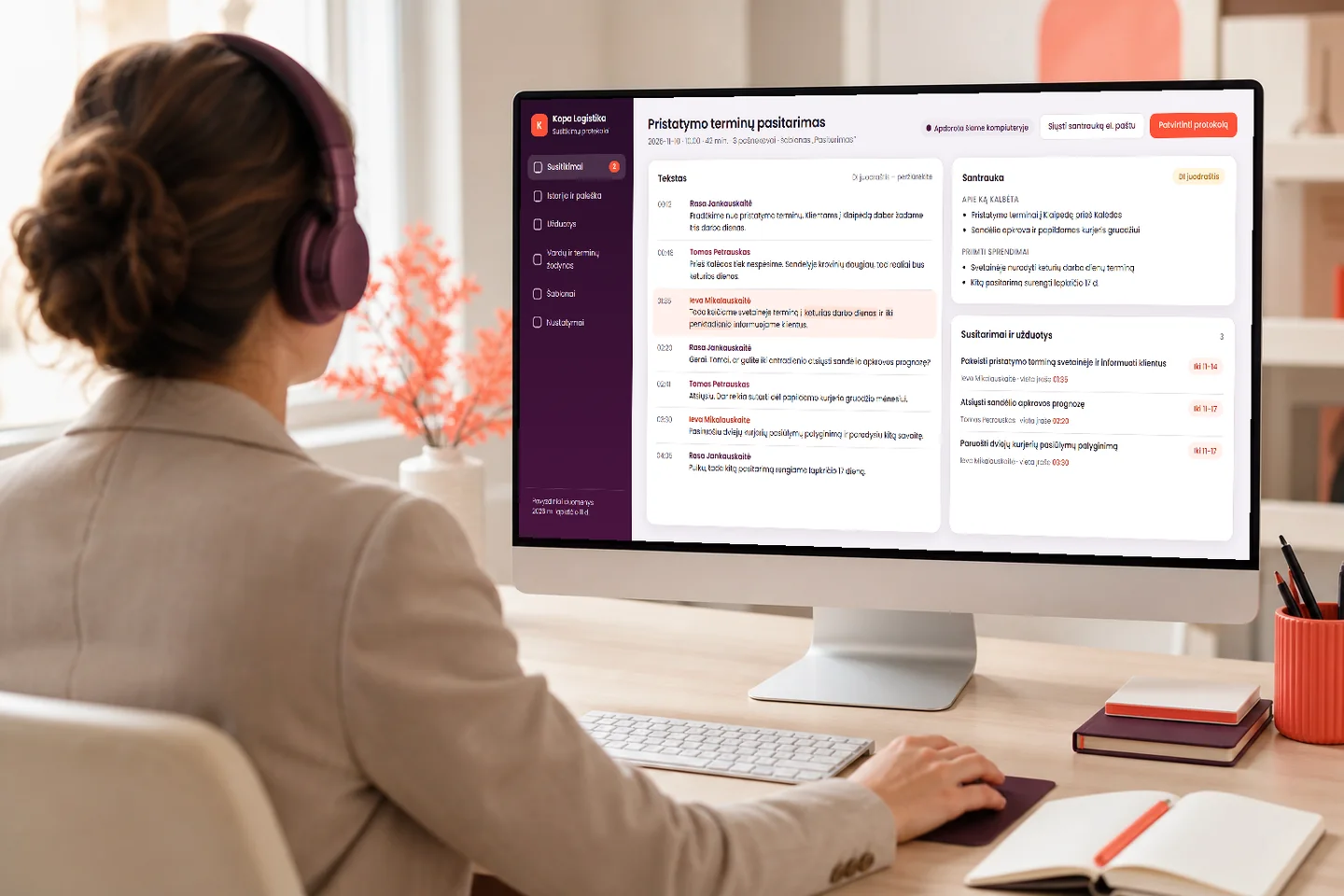
The software listens to an online meeting, a conversation or an audio recording, turns it into text, tells the speakers apart and prepares a short summary and a “who does what by when” list. You can find old conversations by meaning, and the recording and its processing stay on your computer – the software also works without the internet.
- After the meeting – minutes and an action list
- The recording and the text stay on your computer
- A one-off set-up, with no fee for each user
Price – from €390 · no VAT charged Pricing
What you get
What you get after every meeting
Instead of scribbled notes and “what did we agree?” – clear minutes and tasks with named owners.
Minutes without writing them up after the meeting
The software prepares the summary and the list of decisions as a draft. You only have to review, correct and approve it, rather than write it from scratch.
Who does what by when
Agreements and tasks are listed separately: who is responsible, what they have to do and by when. Each one has a link to its place in the recording, so you can check it.
You can find a conversation a month later
The conversation history is searched by meaning, for example “what did we agree about delivery deadlines”, even if those words were not used in the conversation.
What it looks like
How it looks day to day
Three screens: the minutes after a meeting, the conversation history with search, and the tasks from all meetings.
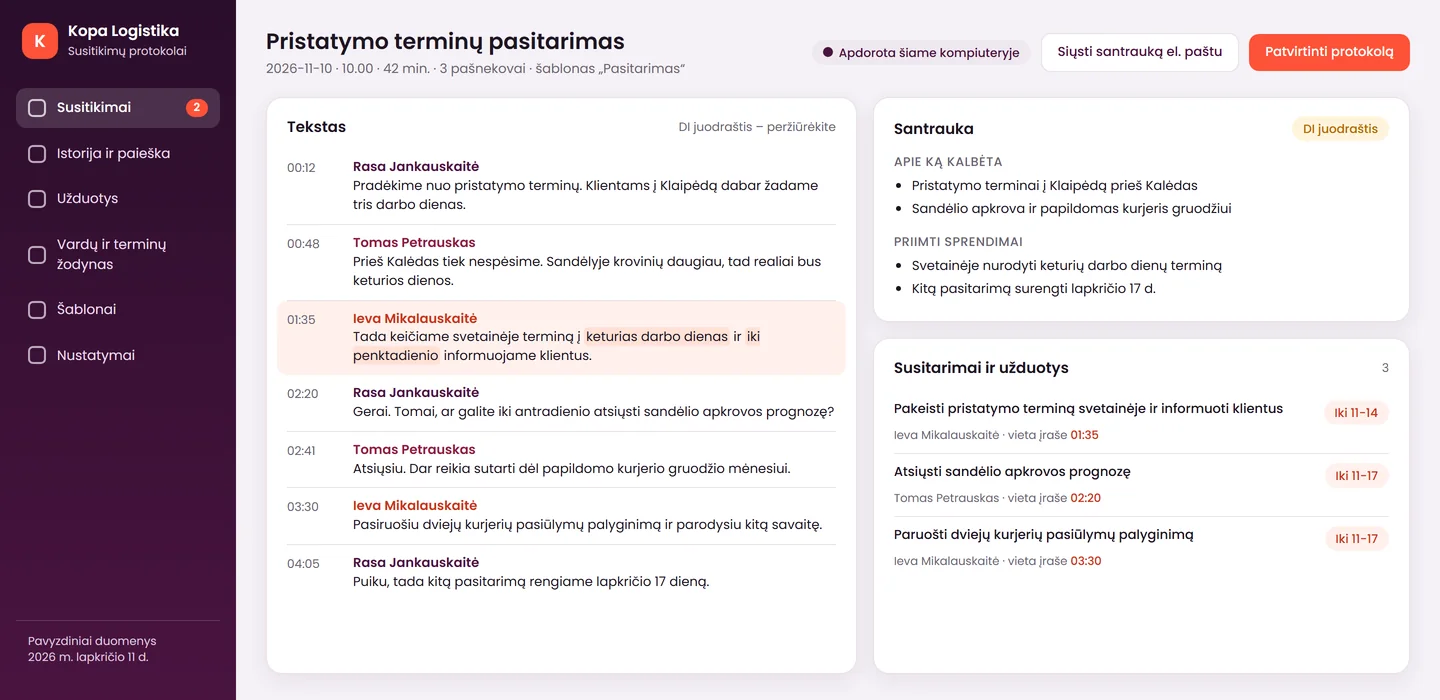
Minutes straight after the meeting
On the left – the text with speakers' names and times; on the right – the summary and the agreements: who, what and by when. A badge shows that the recording was processed on this computer. The text is marked as an AI draft, which you review.
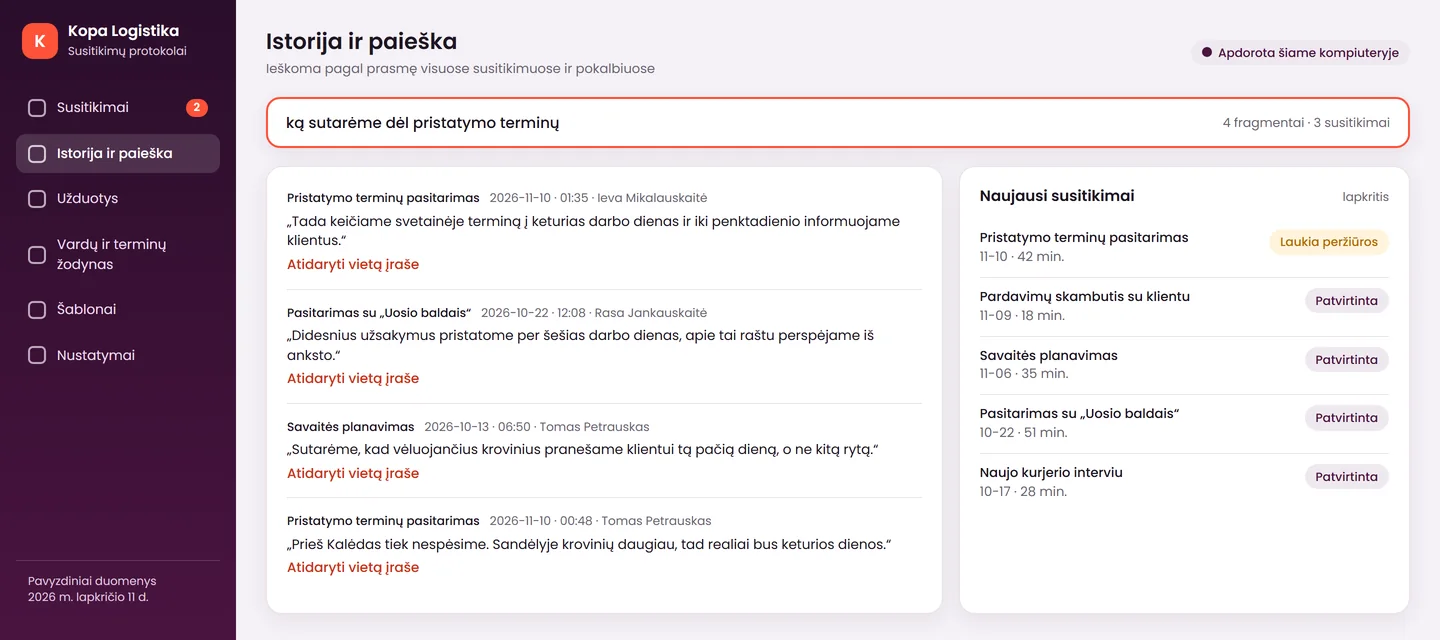
You find old conversations by meaning
You type a question in your own words, and the software shows the matching excerpts from different meetings, with the date and the place in the recording. You do not have to remember which conversation it was.
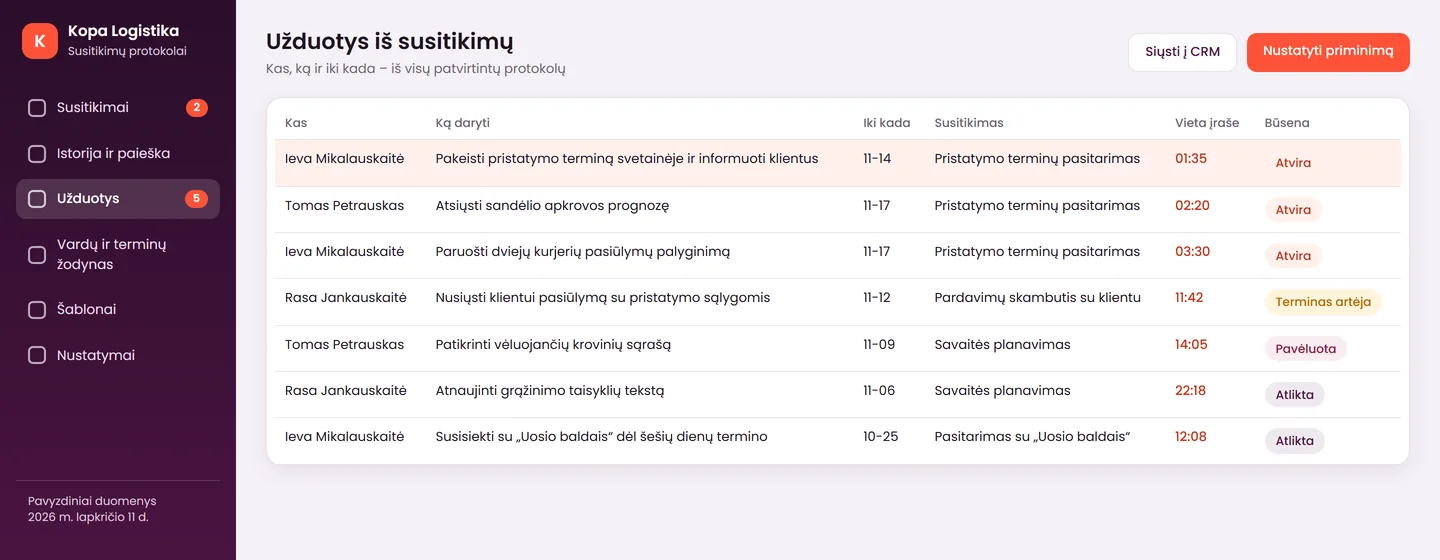
Tasks from all meetings in one place
You see who has to do what and by when, and with one click you go to the place in the recording where the task came from.
The screens show a product mock-up: one of the possible versions, with sample data from the fictional company “Kopa Logistika”. We adapt the software and the templates to each client – to their meetings, deadlines and language. The screens show a Lithuanian interface; yours can be in the language you need.
Advantages
How this software differs from cloud services
Many offers amount to sending the recording to a foreign server and a monthly fee for every person. Our differences lie elsewhere.
The recording stays on your computer
The audio and the text are processed on your computer with a local model. That matters where a conversation is confidential: for lawyers, accountants, HR departments and medical practices.
Works without the internet
The local mode does not need the internet. It is needed only when you yourself choose to send a summary by email, enter a task into a CRM or use a cloud model.
A one-off price, not a monthly one
You pay for the set-up, not for every user every month. An additional computer – €90.
A cloud model – only if you choose it
If the local model's recognition of Lithuanian is not good enough, a cloud model can be connected through an API. The recording then goes to the model provider, and the software warns you of this clearly.
We check the quality before set-up
Before set-up, we try the software on your own recordings and choose a suitable model. We do not promise accuracy percentages – you see the result yourself.
Texts for informing the people on the call
People must be informed before they are recorded. The software provides ready-made notice texts: a phrase for the start of the meeting and an email template.
Features
What the software can do
The main capabilities included in the product.
Recording and text
- listens to an online meeting, a conversation or an uploaded audio recording
- turns speech into text with timestamps
- tells the speakers apart, and you can enter a name instead of “Speaker 1”
- a glossary of names and terms, so that surnames and titles are spelt consistently
- the text can be corrected, and every passage can be listened to in the recording
Summary and tasks
- a short summary: what was discussed and what was agreed
- a list of agreements and tasks: who, what, by when
- summary templates for your meetings, for example sales, team or consultation meetings
- everything is marked as an AI draft that a person reviews
- every item has a link to its place in the recording
History and search
- the history of all conversations in one place
- search by meaning, not only by exact words
- excerpts found, with a date and a link to the recording
- tasks from all meetings in one table
Data and connections
- in the local mode, the recording and its processing stay on your computer
- the retention period and automatic deletion of the audio are set as you choose
- optional – a cloud model through an API, with a clear warning
- optional – a summary by email, reminders and tasks sent to a CRM or a dashboard
- the interface can be prepared in any language you need
Honestly
What the software does not do, and what you have to do
It is better to know the limits in advance than to discover them after set-up.
What the software does
- turns a meeting into text and tells the speakers apart
- prepares a draft summary and task list for you to review
- lets you search old conversations by meaning
- in the local mode, does not send the recording or the text beyond your computer
- provides ready-made notice texts for the people on the call
What it does not do
- does not release you from informing the people on the call: the “local” mode means fewer providers in the chain, but not that a notice is no longer needed
- does not promise that everything will be recognised without errors: the local model may recognise Lithuanian less well than a cloud model, which is why a cloud mode exists
- does not analyse emotions or tone and does not evaluate employees – and never will
- does not give legal advice, and the texts it provides are not legal advice
- without the internet, does not send emails or enter tasks into a CRM – that needs the internet
Value
How to work out whether you need it
We do not promise percentages that we cannot confirm. Instead, work out with your own figures how much time writing up notes after meetings takes now.
| Meetings and conversations per week | example: 8 |
|---|---|
| Minutes of notes after one meeting | example: 15 min. |
| Time per week | example: 8 × 15 = 120 min. (2 h) |
| Cost of an employee hour | your figure |
| Cost of notes per month | hours per week × 4.3 weeks × hourly cost |
The resulting figure shows how much time and money notes after meetings take now. Part of that time you will spend reviewing the minutes instead of writing them – how much you save, the first month will show. Compare it also with the monthly per-user fee that a cloud service would charge.
Packages
Software on your computer, or with a CRM and reminders
The first package is the software itself, the second adds connections to your other systems. The connections are added to the software and cannot be bought separately.
Most popular
Software on your computer
from€390
If you want your meeting recordings and texts to stay with you, and minutes to be ready after the meeting.
Included7
- set-up on one computer, after we check your computer and choose a model
- a local model that works without the internet
- summary templates for your meetings
- a glossary of names and terms
- notice texts for the people on the call
- training: how to review, correct and search
- each additional computer – €90
Not included2
- tasks sent to a CRM, a summary by email, reminders – see the “With CRM and reminders” package
- connecting a cloud model and its usage costs – you pay the provider at its prices
With CRM and reminders
from€590
In addition to the software: if tasks have to reach your system, and the summary has to reach the participants.
Included4
- tasks from meetings sent to your CRM or dashboard
- a summary by email to the participants, once you approve it
- reminders about task deadlines
- the price applies when added to the “Software on your computer” package
Not included2
- building the CRM system itself – that is a separate product
- integrations not listed in the description – priced after assessment
Prices are final – no VAT is charged. Software updates and changes after set-up – €50/hour. If you choose a cloud model, its usage is paid to the provider at its prices. A 12 months warranty applies to programming errors.
Launch
From the first conversation to working software
- Free assessment1–2 working days
We discuss what meetings you hold, in what language, where recordings are kept and on which computers the software has to run.
- Checking your computer and recordingsby agreement
Before set-up, we check your computer, choose a model and test the quality on a few of your recordings. If the local model is not enough, we discuss the cloud mode.
- Set-up and adaptationby agreement
We install the software, build a glossary of names and terms, and prepare summary templates and notice texts for the people on the call. If you chose it, we connect a CRM and reminders.
- Trainingby agreement
We show you how to review and correct the minutes, search the history, set the retention period and inform the people on the call.
Languages
Meetings in different languages
The software and AI work in several languages, and we can prepare the interface in any language you need, not only Lithuanian, Russian or English. We check the quality for specific languages on your recordings before set-up.
- the text and the summary in the language of the meeting
- the interface and templates – in the language you choose
- a glossary of names and terms for all your languages
Together
What else can connect to the software
You can start with the software on your computer and add later whatever you need.
Tasks into a CRM
Agreements and tasks from a conversation go onto the client's record without retyping.
Phone call summaries
Summaries of calls answered by an AI receptionist are prepared in a similar way.
An email after the meeting
A draft email to the client can be prepared from the summary, which you review and send.
Customer questions for the knowledge base
Frequent customer questions from conversations help expand the AI assistant's knowledge base.
Data and law
Recordings, law and data
A recording of a conversation is personal data. These points are not legal advice.
Where it is processed
In the local mode, the recording and the text are processed and stored on your computer. There are fewer providers in the chain, but this does not remove the duty to inform the people on the call.
Informing the people on the call
People must be warned before they are recorded. The software provides ready-made texts: a phrase for the start of the meeting, an email template and a paragraph for your privacy policy. Employees must be informed separately.
The cloud mode
If you connect a cloud model, the recording or text goes to its provider. The software warns you of this before you begin, and we check the provider's terms together.
Retention period
You set the retention period and the automatic deletion of the audio. You can keep only the text and delete the audio after processing.
No emotion analysis
The software does not analyse emotions or tone and does not evaluate employees.
Need a solution tailored to your systems?
Need speech recognition inside your own system, such as a CRM or an internal tool? Let us discuss the project individually.
Send us a sample recording – we will assess it free of charge
Tell us what meetings you hold, in what language and on which computers the software should run. Within 1 working day we will tell you how it can be done and what it will cost.
FAQ
Frequently asked questions
Do I have to inform the other person that the conversation is being recorded?
Yes, we recommend always doing so. A recording of a conversation is personal data, so the other person should be warned before recording begins: state the purpose and the retention period. The software provides ready-made notice texts, but this is not legal advice – for your specific situation, consult a lawyer.
Does a local program mean that GDPR is complied with automatically?
No. In the local mode the recording does not leave your computer and there are fewer providers in the chain, but the duty to warn the people on the call, to have a legal basis and to set a retention period remains with you. We help prepare the texts, while the legal assessment is made by your lawyer.
Does the software recognise Lithuanian well?
That depends on the quality of the recording, the speakers and the model. The local model may recognise Lithuanian less well than a cloud model, which is why a mode with a cloud model exists; in that case the recording goes to its provider, and the software warns you of this. We check the quality on your recordings before set-up and do not promise accuracy percentages.
Does it really work without the internet?
Yes, the local mode, in which a recording is turned into text, a summary and minutes, does not need the internet. The internet is needed only when you choose to send a summary by email, enter a task into a CRM or use a cloud model.
Where are my conversation recordings stored?
In the local mode – on your computer. You set the retention period, and the audio can be deleted automatically after processing, leaving only the text. If you connect a cloud model, the recording or text goes to its provider, and the software warns you of this.
What computer do I need?
We do not state exact requirements, because they depend on the model and on your recordings. Before set-up, we check your computer and choose a suitable model. If the computer is not suitable, we tell you in advance.
Can an employer record employees' conversations?
That is a legal question that needs a specific assessment: it requires a legal basis, informing employees and often a data protection impact assessment. The software does not analyse employees' emotions or tone and does not evaluate their work. Consult a lawyer before you begin.
Can the software connect to Zoom, Teams or Google Meet?
The software is designed to record an online meeting and to process audio recordings. We check exactly how it will work with your meeting software and your computer before set-up.
How does this software differ from Otter or Fireflies?
Such services usually work in the cloud and charge for every user every month. In the local mode, our software processes the recording on your computer, and you pay for the set-up and for adapting it to your meetings. The quality and the list of languages of cloud services may vary, so check the current information with their providers.
Can AI-prepared minutes be used as an official document?
Minutes prepared by AI are a draft that a person reviews and approves. Whether it will serve as an official document depends on your situation – that is a question for a lawyer.
Enquiry
Get a proposal for the software within 1 working day
Tell us what meetings you hold and what language you speak. You can send a sample recording by email. Tel. +370 670 99265.
+370 670 99265Mon–Fri 9:00–18:00
info@saitai.ltWe reply within 1 working day
Alaušo g. 1C, LT-08424 VilniusMeetings by prior arrangement by phone only