

Online CRM for teams, with access rights
An online CRM system is a customer relationship management application that runs in the browser, where several employees work with the same customers, enquiries and tasks at the same time, while each person sees and edits only what their role allows. Saitai.lt builds these CRM systems around your process and hands over the source code. Prices start at €1,900, with a timeline of 4–8 weeks.
In short
- Price
- from €1,900 (customers, enquiries, quotes, tasks, reminders, roles); no VAT is added
- Timeline
- 4–8 weeks; a larger system can be launched in stages
- Included
- roles and access rights, change history, reports, export to Excel and PDF, data migration, training, the system's source code
- Users
- from a few to several dozen employees at the same time; no per-user fees
- Hosting
- a virtual private server (VPS) in the EU (hosting and maintenance) from €29/month, or your company's own server
- Technology
- Laravel (PHP), MySQL; runs in the browser on computers and phones
- Warranty
- 12 months
- Payment
- 50% deposit, balance when the system goes live
- Where we work
- remotely, all over Lithuania; meetings in Vilnius by appointment, arranged by phone
Who it’s for
- Three or more people deal with customers, and information about the same customer is scattered across their inboxes and notes.
- Sales managers mustn't see each other's customers, purchase prices or margins, while management needs to see everything.
- You work from the office, on site, from home or across several branches, so the data has to be available online, not on a single computer.
- You need to know who changed a customer's details, a price or an order status, and when.
- When an employee leaves, their customers need handing over to a colleague in minutes, not dug out of their emails.
- You pay per user for an off-the-shelf CRM, even though some of your staff only open it a few times a week.
When it’s not the right fit
- You work alone or as a pair. Then a well-organised spreadsheet is usually enough, or, if there's a lot of data, moving your Excel spreadsheets to a database (from €990).
- All employees can see all the data, and your sales process is standard. Then an off-the-shelf CRM such as Pipedrive or HubSpot will get you started within days.
- You need bookkeeping: payroll, VAT registers or i.SAF (the Lithuanian VAT invoice register). That's the job of accounting software: a CRM can pass data to it, but doesn't replace it.
Included
What you get
Roles and access rights
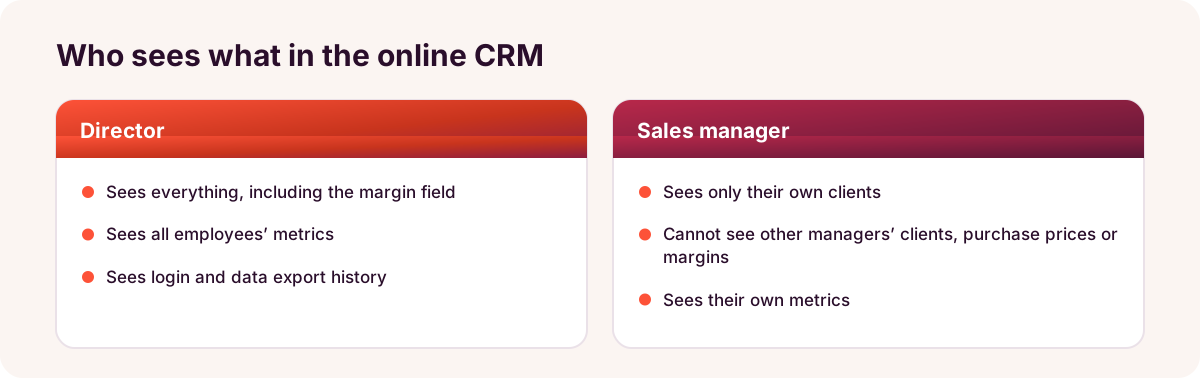
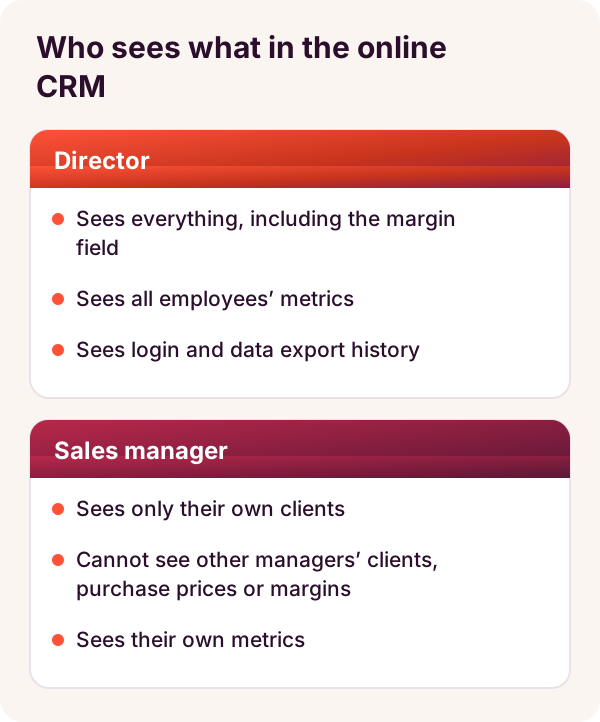
For each role, we set which modules, records and fields it can see, edit or delete. For example, a sales manager sees only their own customers, and only management sees the margin field.
Working at the same time
Everyone works with the same data: refresh the page and you see your colleagues' changes – no more file copies.
Customers, enquiries and quotes
The customer record holds contacts, enquiries, PDF quotes, files and comments. An enquiry can be assigned to an employee and its status tracked all the way to a deal.
Tasks and reminders
Every task has an owner and a deadline, and the system reminds you of scheduled calls, meetings or contracts coming to an end.
Change history and audit log
Every record shows who changed what and when, and management can also see the history of logins and data exports.
Managing employee accounts
You add new employees and assign their roles yourself. When someone leaves, you deactivate their account and hand their customers over to a colleague in a few clicks.
Reports by employee
Enquiries, quotes and deals by sales manager, period or source, with export to Excel and PDF. Employees see their own figures, management sees everyone's.
Source code, training and a 12-month warranty
We walk each role through its workflow, hand over the system's source code when the project is complete, and fix bugs free of charge for 12 months.
Price
How much does an online CRM system cost?
Price from
€1,900
An online CRM for several employees costs from €1,900: the price includes modules for customers, enquiries, quotes, tasks and reminders, roles and access rights, change history, reports and data migration. If you only need to move 1–2 spreadsheets, moving Excel spreadsheets to a CRM is enough – from €990.
Prices include all taxes – no VAT is added (we are not VAT-registered). The final price depends on the project: we put it and the timeline in the contract before work starts.
What the price depends on
- How many roles you need and how detailed the permissions are: at module, record or even individual field level.
- How many modules the first version needs: besides customers and tasks, for example contracts, sites or service jobs.
- How many document templates (quotes, contracts, completion certificates) and reports you need.
- Whether you need extra security, such as two-factor authentication or logins only from office IP addresses.
- Whether you need integrations with your website, email, online store or accounting software.
Additional costs
- A system like this needs its own hosting, so it doesn't run in a shared website hosting environment but on a VPS in the EU. The VPS (hosting and maintenance: SSL certificate, updates, daily backups) costs from €29/month; the final price depends on the server's capacity and the size of the system. If your company has its own server, we can install the system there.
- There are no per-user fees; integrations and new modules after launch are quoted separately, with the price and timeline confirmed in writing.
Timeline
How long does it take to build an online CRM?
An online CRM takes 4–8 weeks from receiving the deposit. We launch larger systems in stages, so your staff can start using the customers and enquiries module after the first stage.
| Scope | Example | Timeline |
|---|---|---|
| Core modules | customers, enquiries, tasks, 2–3 roles, reports | 4–5 weeks |
| With documents and reminders | plus quotes and contracts as PDFs, reminders, more detailed permissions | 5–6 weeks |
| With integrations | plus enquiries from your website, a connection to your online store or accounting software, several departments | 6–8 weeks |
Process
How it works
- Free consultation1–2 working days
We discuss who works with whom: who receives enquiries, who prepares quotes, who approves them and what management needs to see.
- Roles and permissions table, fixed price2–5 working days
For each role, we write down what it sees, edits and approves. The price and timeline go into the contract, and we start once we receive the 50% deposit.
- Screen prototype3–5 working days
We show you mock-ups of the customer record, lists and forms as each role will see them, and agree them before development.
- Development in stages2–5 weeks
We build the modules and show you the results every 1–2 weeks in a test environment, where employees in different roles try them out.
- Data migration1–5 working days
We migrate customers and their history, assign records to the responsible employees and check record counts against the source.
- Training and launch1–2 working days
We create the accounts, walk each role through its workflow, and hand over a guide and the system's source code.
- Warranty and further development12 months
For 12 months, we fix bugs free of charge. You manage users and their roles yourself, and we quote new modules or integrations separately.
Comparison
A shared spreadsheet, an off-the-shelf CRM or a custom online CRM?
| Criterion | Shared spreadsheet (Google Sheets) | Off-the-shelf CRM (SaaS) | Online CRM (Saitai.lt) |
|---|---|---|---|
| Upfront cost | €0 extra | €0 + your time for setup | from €1,900 |
| Monthly costs | €0 extra | usually charged per user | VPS (hosting and maintenance) from €29/month; doesn't depend on the number of users |
| Access permissions | for the whole spreadsheet or sheet; anyone who can edit can change everything | based on the vendor's roles and your plan | based on your roles: at module, record or field level |
| When an employee leaves | sharing has to be changed and file copies checked | deactivate the account and cancel the licence | deactivate the account, hand customers to a colleague in a few clicks |
| Where the data is stored | Google's cloud | the vendor's cloud, not always in the EU | a VPS in the EU or your own server; the source code is handed over to you |
| Best for | 2–3 people, when everyone can see everything | a standard sales process | a team where different people need to see different data |
Examples
Typical scenarios
Estate agency
- Situation
- For example, an estate agency has several agents. Each manages their own clients and properties separately, and when an agent leaves, their buyers' contact details go with them.
- Solution
- A CRM with properties, buyers and a viewings calendar. Each agent sees their own clients and all properties for sale, while management sees the activity of every agent.
- Result
- A client base that belongs to the agency, and a summary of viewings by agent.
Training centre
- Situation
- For example, at a training centre, administrators register participants, trainers get group lists by email, and the accountant checks payments in a separate spreadsheet.
- Solution
- A system with courses, groups and participants. Trainers see only their own groups and mark attendance; the accountant sees invoices and payments, but not participants' assessments.
- Result
- One participant list for everyone, and a list of unpaid participants in one click.
Orders between departments at a manufacturer
- Situation
- For example, a furniture manufacturer's sales managers pass orders to production by email, and the production foreman reports late materials by phone.
- Solution
- A CRM where each order moves from the sales manager to production and logistics. Production sees the specification without prices, and logistics sees the delivery details.
- Result
- Fewer calls between departments, and the status of every order in one place.
Tell us who needs to see what – we'll assess it for free
Tell us how many employees will use the CRM system and what their jobs are. Within 1 working day, we'll tell you which roles you need, how much the system would cost and how long it would take.
FAQ
Frequently asked questions
Yes. We set permissions according to your rules: an employee can see only the customers assigned to them, their team's or region's customers, or everyone's but without certain fields, such as the margin or purchase price. The same rules apply to exports: an employee can export only the data they can see, or exporting can be switched off for them.
More
Related services
Custom CRM development built around your processes
All our CRM solutions: moving Excel spreadsheets (from €990), accounting and reporting software (from €1,200), business CRM (from €1,900).
Moving Excel spreadsheets to a CRM or database
When a system for 1–2 spreadsheets and up to 5 users is enough – from €990.
API integration
Connecting your CRM with your website, online store and other systems.
AI agent development for business
An AI agent that logs enquiries in your CRM system and drafts replies – from €1,490.
Enquiry
Get an online CRM quote within 1 working day
Tell us how many employees will use the system, what their jobs are and what each of them needs to see. You can email us sample spreadsheets or forms without personal data. Tel. +370 670 99265.
Phone / WhatsApp / Viber:
+370 670 99265
Email:
info@saitai.lt
We reply within 1 working day. Meetings in Vilnius are by appointment only – please call first.

