

Moving Excel spreadsheets to a CRM or database
Moving from Excel to a CRM means turning your working spreadsheets into an online CRM (customer relationship management) system or database, where several employees work with the same data at the same time, each according to their own permissions. Saitai.lt migrates all your data from Excel, Google Sheets or CSV and builds search, filters and reports. Prices start at €990, with a timeline of 2–4 weeks.
In short
- Price
- from €990 (1–2 spreadsheets, up to 5 users); no VAT is added
- Timeline
- 2–4 weeks; a larger CRM with integrations – 4–8 weeks
- Included
- data migration, roles and permissions, search and filters, reports, export to Excel and PDF, training, the system's source code
- Technology
- Laravel (PHP), MySQL; runs in the browser on computers and phones
- Users
- up to 5 in the initial version, with different roles; no per-user fees
- Warranty
- 12 months
- Payment
- 50% deposit, balance when the system goes live
- Where we work
- remotely, all over Lithuania; meetings in Vilnius by appointment, arranged by phone
Who it’s for
- Three or more people fill in the same spreadsheet, and the folder keeps filling up with files like "final_v2" and "final_really".
- The spreadsheet gets passed around by email, and someone accidentally deletes a column or overwrites a colleague's data.
- Each employee should see only their own customers, sites or orders, not the whole spreadsheet with prices and margins.
- Your "Excel CRM" – a spreadsheet of customers and enquiries – has grown to thousands of rows, opens slowly, and the formulas keep breaking.
- Every month, a manager or accountant puts together summaries by hand.
- You need to know who changed what and when – for example, when a price or an order status changes.
- Your spreadsheet tracks not customers but sites, equipment, contracts or members. Then we build a database rather than a CRM, with the same search, permissions and reports.
When it’s not the right fit
- Only 1–2 people use the spreadsheet, it grows slowly and there are no errors. Then Excel or Google Sheets with protected sheets is enough.
- Your sales process is standard (enquiry – quote – deal). An off-the-shelf CRM such as Pipedrive or HubSpot will get you started faster, if a monthly per-user fee suits you.
- Your process still changes every few weeks. It's worth letting it settle in the spreadsheet first, and building the system once it's clear which fields and reports you need.
- You need bookkeeping (invoice registers, i.SAF, payroll). That's what accounting software is for – a CRM doesn't replace it, but can be connected to it.
Included
What you get
An online system with nothing to install
The system runs in the browser on computers, tablets and phones. Each employee logs in with their own password – no more emailing files around.
A database built from your spreadsheets
Columns become fields with a clear type: date, amount, choice from a list. Related tables, such as customers and orders, are linked, so each customer is entered only once.
All your data migrated
We import data from Excel, Google Sheets or CSV: we standardise date and phone number formats, remove duplicates and go through any doubtful rows with you.
Users, roles and change history
Up to 5 users with different roles (for example, manager, sales manager, accountant). Each person sees and edits only what they are allowed to, and every record shows who changed it and when.
Search and filters
Find a record by any field, and save frequently used filters, such as "unpaid orders this month", as separate lists in the menu.
Reports and export
Summaries by period, employee or status are produced in one click. Lists can be exported to Excel, and reports to PDF as well.
Training and a 12-month warranty
We show each role how to work in the system and hand over a short guide. For 12 months, we fix system bugs free of charge.
Price
How much does it cost to move Excel spreadsheets to a CRM?
Price from
€990
Moving Excel spreadsheets to a CRM costs from €990: that's the price of a system for 1–2 spreadsheets and up to 5 users, including data migration. If you need more modules – tasks, reminders, quotes or integrations – that's a business CRM, priced from €1,900.
Prices include all taxes – no VAT is added (we are not VAT-registered). The final price depends on the project: we put it and the timeline in the contract before work starts.
What the price depends on
- How many spreadsheets and sheets need moving, and how they relate to each other.
- How much data clean-up is needed: duplicates, different date and amount formats, merged cells.
- How many roles you need and how detailed the permissions are – for example, seeing only your own records, or read-only access.
- How many formulas and macros (VBA) need turning into system calculations.
- Which reports, document templates (PDF) and export formats you need.
- Whether you need integration with your website, online store or accounting software.
Additional costs
- A system like this needs its own hosting, so it doesn't run in a shared website hosting environment but on a virtual private server (VPS) in the EU. The VPS (hosting and maintenance: SSL certificate, updates, daily backups) costs from €29/month; the final price depends on the server's capacity and the size of the system. If your company has its own server, we can install the system there.
- There are no per-user fees – the monthly cost doesn't depend on the number of users.
- New modules and integrations after launch – under a separate quote, confirmed in writing.
Timeline
How long does it take to move from Excel to a CRM?
A system for 1–2 spreadsheets takes 2–4 weeks from receiving the deposit and the spreadsheets. A larger CRM with several modules and integrations takes 4–8 weeks, and can be launched in stages.
| Project size | Example | Timeline |
|---|---|---|
| 1 spreadsheet | a register of customers, equipment or contracts for up to 5 users | 2–3 weeks |
| 2 related spreadsheets | customers and their orders, or sites and jobs; roles, reports | 3–4 weeks |
| 3 or more spreadsheets, integrations | customers, quotes, tasks, reminders, connection to an online store or accounting software | 4–8 weeks |
Process
How it works
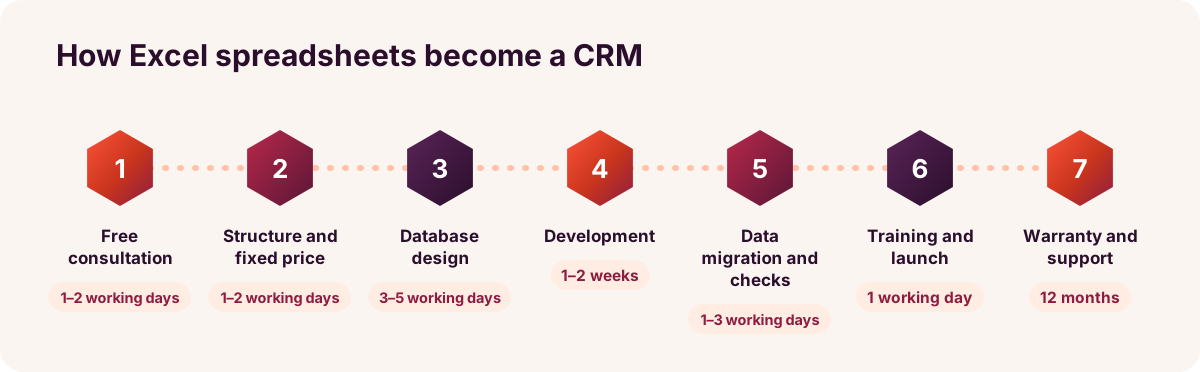
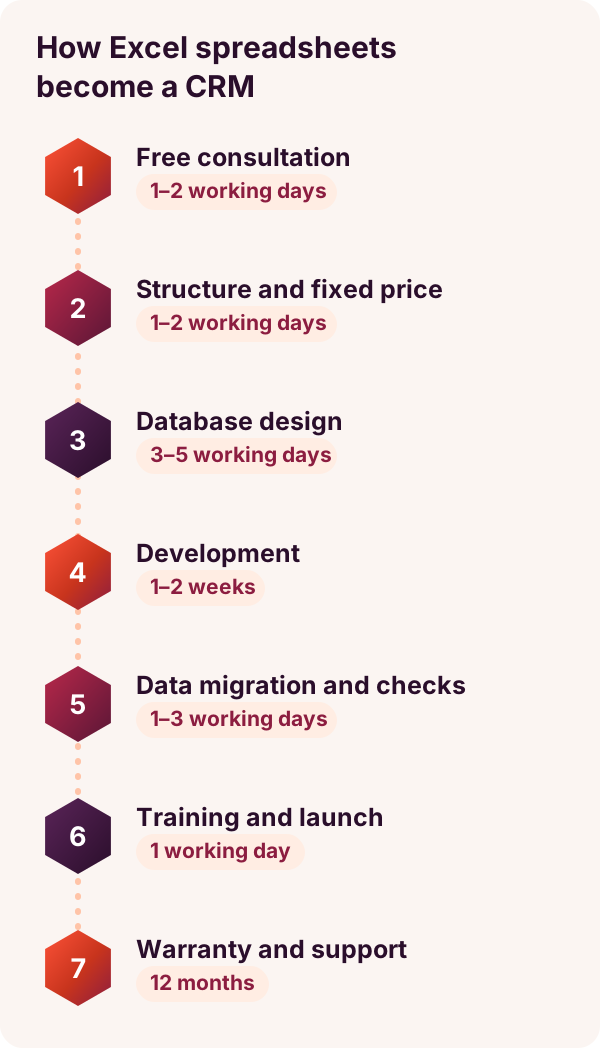
- Free consultation1–2 working days
We discuss who fills in the spreadsheets and how, and what management needs to see. A copy of the spreadsheet without personal data is enough.
- Structure and fixed price1–2 working days
We define the fields, roles and reports, and what the first version won't include. The price and timeline go into the contract, and we start once we receive the 50% deposit.
- Database design3–5 working days
We split your spreadsheets into related database tables, so each customer or site is entered only once. We agree the main screens with you.
- Development1–2 weeks
We build the forms, lists, search, filters, roles and reports. You try out an interim version in a test environment.
- Data migration and checks1–3 working days
We import all the data, check record counts and totals against the original file, and go through doubtful rows with you.
- Training and launch1 working day
We show users in each role how to work with the system, remotely or in person. From that day on, work is done in the system, and the original file stays in the archive.
- Warranty and maintenance12 months
For 12 months, we fix bugs free of charge. With a maintenance plan, we take care of updates and backups; a VPS (hosting and maintenance) costs from €29/month.
Comparison
Excel, an off-the-shelf CRM or a custom system?
| Criterion | Excel / Google Sheets | Off-the-shelf CRM (SaaS) | Custom system (Saitai.lt) |
|---|---|---|---|
| Upfront cost | €0 extra | €0 + your time for setup and import | from €990 |
| Monthly costs | €0 extra | usually charged per user | VPS (hosting and maintenance) from €29/month; doesn't depend on the number of users |
| Several users at once | Google Sheets – yes; Excel files often end up with copies and conflicts | yes | yes |
| Access permissions | at file or sheet level | based on the roles the vendor provides | based on your roles, down to individual fields or records |
| Fit with your process | flexible, but anyone can change the structure | as far as settings and add-ons allow | fields, statuses and reports built around your process |
| Where the data is stored | your computer or the cloud | the vendor's cloud, not always in the EU | a VPS in the EU or your own server; data can be exported at any time |
| Integration with Lithuanian accounting software | manual import and export | via add-ons, if available | possible via API or import, quoted separately |
| Best for | 1–2 people, while there isn't much data | a standard sales process | a non-standard process with 3 or more users where permissions matter |
Examples
Typical scenarios
Sites and jobs spreadsheet for a construction company
- Situation
- For example, a construction or renovation company keeps its list of sites, jobs and responsible foremen in a single Excel file. The manager fills it in at the office, while foremen report completed work by phone.
- Solution
- A database with three linked parts: sites, jobs and employees. Each foreman sees only their own sites on their phone and marks completed work themselves, while the manager sees all sites and filters them by status.
- Result
- One always up-to-date version of the data, fewer calls and less re-keying, and a list of overdue jobs in one click.
Customer and inspection register for an equipment service company
- Situation
- For example, an equipment maintenance company keeps its customers, their equipment and the dates of the latest inspections in a Google Sheets spreadsheet. The next inspection date has to be worked out by hand.
- Solution
- A customer and equipment database: the next inspection date is calculated automatically, and the "Inspection due in 30 days" list shows who needs a call.
- Result
- A list of upcoming jobs, the full history of each piece of equipment on a single record, and an Excel export for the accounts team.
Sales enquiries at a wholesale company
- Situation
- For example, at a wholesale company, several sales managers log enquiries and quotes in a shared spreadsheet. Everyone sees everyone's customers and prices, and the manager works out by hand how many quotes turned into orders.
- Solution
- A simple CRM with customers, enquiries and quote statuses. Each sales manager sees their own customers, while the manager sees all of them, plus a report by sales manager and month.
- Result
- Customers and prices visible according to permissions, a sales summary with no manual calculations, and the option to add reminders later.
Send us your spreadsheet – we'll assess it for free
Describe who fills in your spreadsheet and how. Within 1 working day, we'll tell you what kind of system would suit you, how much it would cost and how long it would take.
FAQ
Frequently asked questions
Yes. The connection is encrypted (HTTPS), and each employee logs in with their own password and sees only what their role allows. When the system is hosted on our servers, it runs in the European Union, with daily database backups. For a VPS or your own server, we agree its location and the backup procedure before launch. If the system will hold personal data, we'll discuss how it is handled in line with the GDPR.
More
Related services
Custom CRM development built around your processes
When you need to manage deals, tasks, reminders and reports – from €1,900.
Online CRM for teams, with access rights
Each employee sees and edits only the data they are allowed to.
Accounting and reporting software for managers and accountants
One-click reports for managers and accountants – from €1,200.
Accounting software integration with your online store
Online store orders and invoices reach your accounting software without re-keying.
Enquiry
Get a quote within 1 working day
Tell us which spreadsheets you use and how many people fill them in. You can email us a sample spreadsheet without personal data. Tel. +370 670 99265.
Phone / WhatsApp / Viber:
+370 670 99265
Email:
info@saitai.lt
We reply within 1 working day. Meetings in Vilnius are by appointment only – please call first.

