

Accounting software integration with your online store
Integrating accounting software with an online store means orders, invoices, products and stock levels pass automatically between the store and the accounting system, so your accountant doesn't have to re-key them. Saitai.lt connects WooCommerce, VirtueMart or custom online stores with popular Lithuanian accounting systems and other accounting software. Prices start at €490, with a timeline of 1–4 weeks.
In short
- Price
- from €490 (ready-made module or configuration); custom API integration quoted after assessment; no VAT is added
- Timeline
- 1–2 weeks (ready-made module); 2–4 weeks (custom integration)
- Accounting software
- Lithuanian systems such as Rivilė, B1.lt, Centas, Finvalda, Debetas, Agnum, Stekas and others – as long as the software has an API or an import option
- Online stores
- WooCommerce, VirtueMart, custom online store (Laravel)
- What is transferred
- orders, invoices, customers, products, prices, stock levels, payment statuses
- Warranty
- 12 months
- Payment
- 50% deposit, balance when the integration goes live
- Where we work
- remotely, all over Lithuania; meetings in Vilnius by appointment, arranged by phone
Who it’s for
- Your accountant enters every online store order into the accounting software by hand or from an exported Excel file.
- The stock levels shown in your store don't match those in the accounting software, so you sometimes sell a product you no longer have.
- New products and prices appear in the accounting software first, and you then add them to the store separately.
- You issue invoices to customers separately from the store, so some of them are late or duplicated.
- Orders are growing, and transferring them every week takes up hours of your accountant's or sales manager's time.
- You are switching accounting software or online store and want the data exchange to work from day one.
When it’s not the right fit
- You get a few orders a week. In that case, importing sales into the accounting software from a file once a month is usually enough.
- Your accounting software has neither an API nor a data import option. Then automatic integration isn't possible – it's worth talking to the software vendor first.
- You expect the integration to replace your accountant. It transfers data, but VAT returns, i.SAF (the Lithuanian VAT invoice register) and other reports remain your accountant's responsibility.
Included
What you get
Data exchange specification
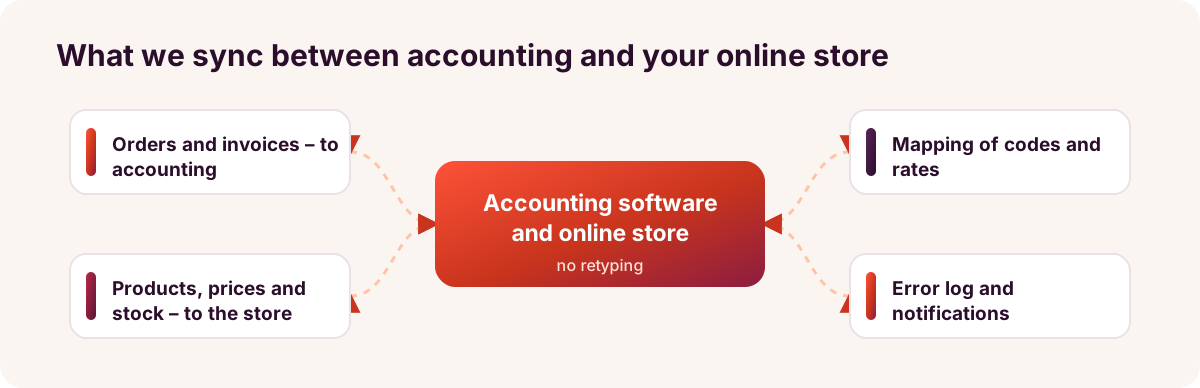
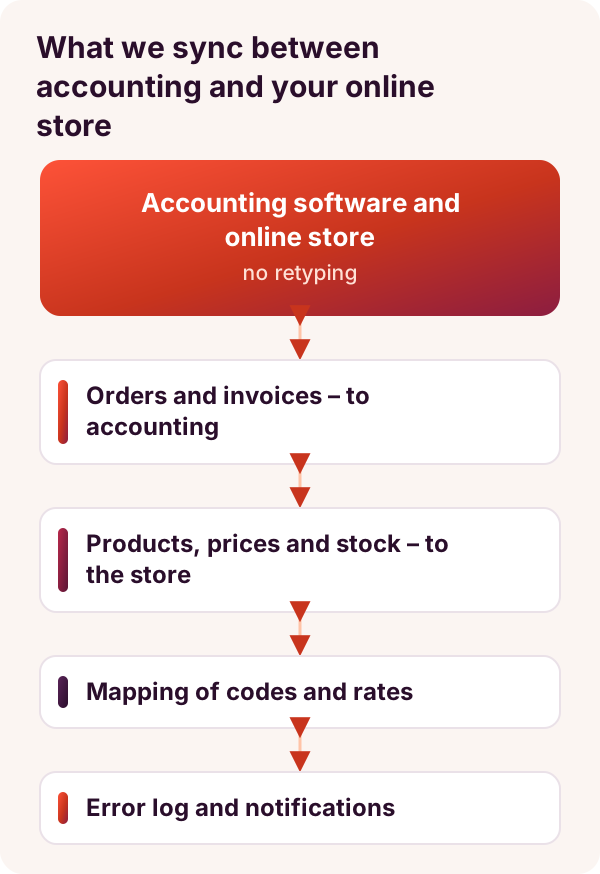
Together with you and your accountant, we set out which data moves in which direction and how often, and what happens with returns or cancelled orders.
Orders and invoices – into your accounts
A paid or fulfilled order becomes a sales document in the accounting software, with the customer, products, VAT and a delivery line.
Products, prices and stock – into your store
Prices and stock levels from the accounting software are updated in the online store on a schedule, or after every change if the software allows it.
Mapping codes and rates
We map product codes, VAT rates, warehouses, payment and delivery methods, and the details of private and business customers, so that the documents follow your accountant's procedures.
Error log and notifications
Every transfer is logged. If an order can't be transferred, you get a notification with the reason, and once the error is fixed, the order can be sent again.
Testing with real orders
Before launch, we test the integration with real orders in a test environment or on a copy of your accounting data, and your accountant checks the documents created.
Accountant's guide and a 12-month warranty
We hand over a short guide on what to do when product codes change or an error notification arrives. For 12 months, we fix integration bugs free of charge.
Price
How much does it cost to integrate accounting software with an online store?
Price from
€490
Integrating an online store with accounting software costs from €490 when a ready-made module exists for the software, or the solution only needs configuring. A custom API integration, where you need two-way sync or non-standard rules, costs more – we put the price in our quote once we have checked the software's API.
Prices include all taxes – no VAT is added (we are not VAT-registered). The final price depends on the project: we put it and the timeline in the contract before work starts.
What the price depends on
- Which accounting software and version you use: cloud-based or installed on a computer, and whether it has an API.
- Which direction the data travels in: only orders into your accounts, or products, prices and stock levels back as well.
- How many products, variants (sizes, colours) and warehouses need mapping.
- Which documents need to be produced: invoices, credit notes for returns, pro forma invoices.
- How many payment and delivery methods need mapping to your accounting settings.
- Whether your existing data needs tidying up before the integration, for example making product codes consistent.
Additional costs
- A fee for the accounting software's API, module or extra user licence, if the vendor charges one – paid directly to the vendor.
- If the software is installed on an office computer, you may need the vendor's connector or a small intermediary program – we check this before signing the contract.
- Integration support after the warranty, and new data flows – under a separate agreement, confirmed in writing.
Timeline
How long does an accounting software integration take?
An integration with a ready-made module takes 1–2 weeks, and a custom API integration 2–4 weeks from receiving the deposit and access to the accounting software. Most of the time usually goes not on coding, but on mapping the data and checking it with your accountant.
| Integration scope | Example | Timeline |
|---|---|---|
| One-way transfer | orders and invoices from the online store to the accounting software | 1–2 weeks |
| Two-way sync | orders into your accounts; products, prices and stock levels into the online store | 2–3 weeks |
| Custom integration | several warehouses, customer-specific B2B prices, returns, several online stores | 3–4 weeks |
Process
How it works
- Free consultation1–2 working days
We find out which accounting software and version you use, which platform your online store runs on, and which data you want to transfer.
- API check and fixed price2–3 working days
We check the software's API documentation or existing modules and, if needed, get test access. The price and timeline go into the contract, and we start once we receive the 50% deposit.
- Mapping with your accountant1–3 working days
We agree VAT rates, product codes, document series, warehouses, and payment and delivery methods.
- Development or module configuration3–10 working days
We build the data exchange, the sync schedule, the error log and notifications.
- Testing with real orders2–5 working days
We transfer test orders, a return and a stock change, and your accountant checks the documents in the accounting software.
- Launch and monitoring1–5 working days
We switch the integration on from an agreed date, usually the start of a month, and check the log daily for the first few days.
- Warranty and support12 months
For 12 months, we fix integration bugs free of charge. With a support plan, we update the integration whenever the accounting software or online store changes its API.
Comparison
Manual entry, file import or automatic integration?
| Criterion | Manual entry | Regular file import | Automatic integration (Saitai.lt) |
|---|---|---|---|
| Upfront cost | €0 | often €0, if the software has an import feature | from €490 |
| Staff time | for every order | for every import and for fixing its errors | only reviewing error notifications |
| How up to date the data is | whenever the accountant enters it | once a day, week or month | immediately after the event, or on a schedule |
| Stock levels in the online store | corrected by hand | corrected by hand or with a separate import | updated automatically |
| Risk of errors | high: typing errors, missed orders | medium: format errors and duplicates | low; failed transfers are visible in the log |
| Best for | a few orders a month | few orders and no need to sync stock | many orders, or when accurate stock levels matter |
Examples
Typical projects
Clothing store with product variants
- Situation
- For example, a WooCommerce clothing store has several hundred products in different sizes and colours. Stock is managed in the accounting software and corrected by hand in the store, so a size that has already sold out sometimes gets sold.
- Solution
- Each product variant is mapped to a product code in the accounting software. Stock levels in the store are updated on a schedule, and paid orders are transferred to the accounts as sales documents with a delivery line.
- Result
- Matching stock levels, fewer cancelled orders and sales in the accounts without manual entry.
Pro forma invoices and bank transfer payments
- Situation
- For example, a plumbing supplies company sells online to installers, and most of them pay by bank transfer against a pro forma invoice. The accountant sees payments in the accounting software, while the sales manager asks every day which orders can be shipped.
- Solution
- The order is transferred to the accounting software as a pro forma invoice, and once the accountant marks it as paid, the order status in the online store changes to "Paid" on the next scheduled sync.
- Result
- Pro forma invoices without manual issuing, a clear list of which orders can be shipped and fewer questions for the accounts team.
Product returns
- Situation
- For example, an online shoe store receives dozens of returns every month. Customers are refunded from the store, while the accountant enters the return documents into the accounting software by hand and checks that the amounts match.
- Solution
- When a return is marked on the order, a return document linked to the original sales invoice is sent to the accounting software, and the returned product's stock level is updated. We implement this transfer if the accounting software's API supports it.
- Result
- Returns in the accounts without manual entry, matching amounts and correct stock levels after a return.
Tell us which accounting software you use
Let us know your accounting software, its version and your online store platform. Within 1 working day, we'll tell you how to connect them, how much it would cost and how long it would take.
FAQ
Frequently asked questions
With popular Lithuanian accounting systems: Rivilė, B1.lt, Centas, Finvalda, Debetas, Agnum, Stekas and others, as long as the software has an API or a data import and export option. Capabilities differ even between versions of the same software, so before signing the contract we check which data your software allows us to read and write.
More
Related services
Rivilė integration with your online store
Products, prices, stock levels and orders exchanged between your online store and Rivilė.
B1.lt integration with your online store
Orders, invoices and stock levels exchanged between your online store and B1.lt.
Product import and sync (XML, CSV, API)
Supplier products, prices and stock levels in your online store – automatically.
Accounting and reporting software for managers and accountants
When you need summaries as well as data transfers – from €1,200.
Enquiry
Get an integration quote within 1 working day
Tell us which accounting software and online store you use, and which data you want to transfer automatically. Tel. +370 670 99265.
Phone / WhatsApp / Viber:
+370 670 99265
Email:
info@saitai.lt
We reply within 1 working day. Meetings in Vilnius are by appointment only – please call first.

