

Ready-made product
Voice assistant for websites – visitors click and talk
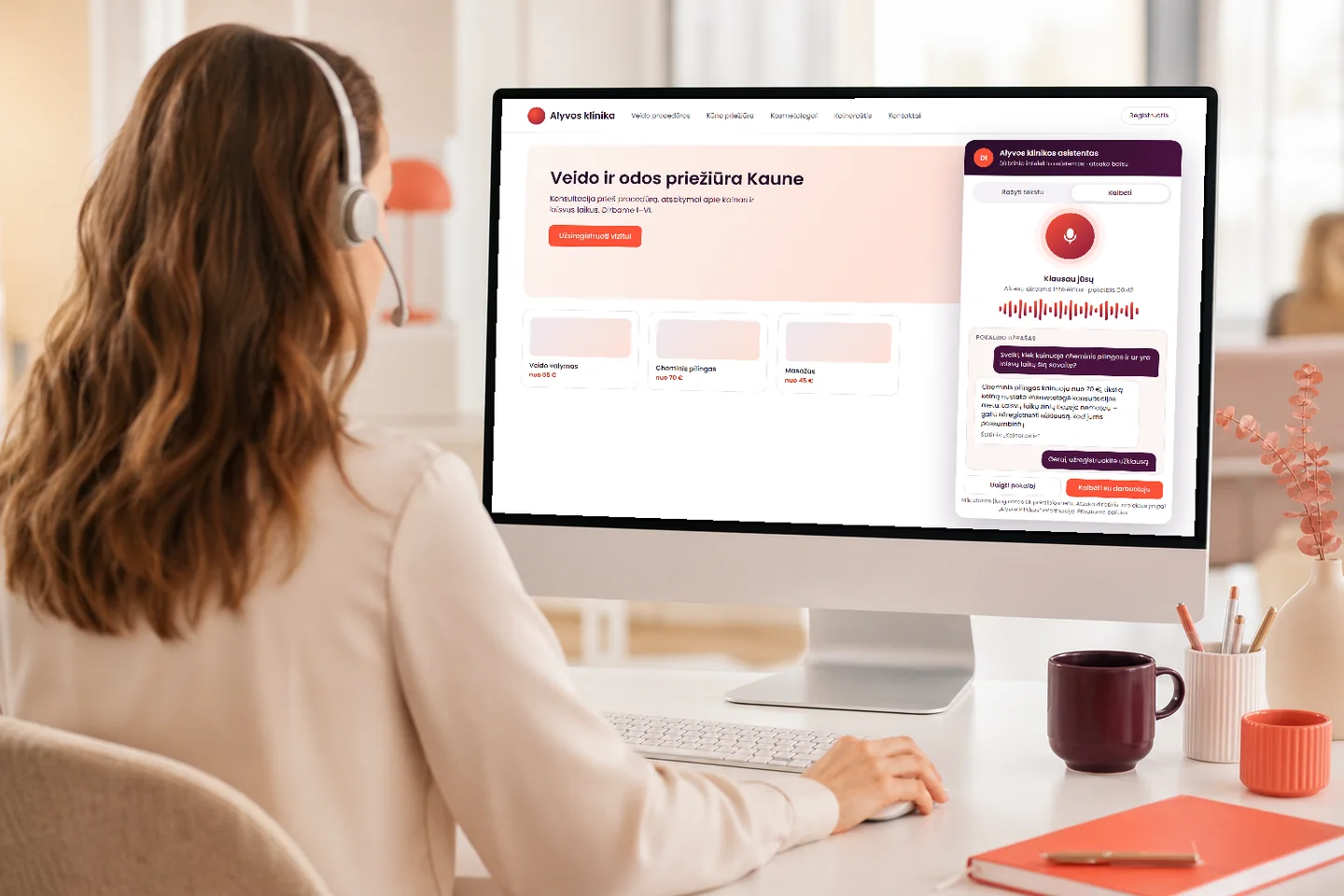
We add a “Talk” button to your AI assistant. Using the browser microphone, a visitor asks a question aloud, and the assistant answers aloud from the same knowledge base that the text assistant uses. The text window always stays alongside, and you can see how many people spoke and how many minutes it took.
- The same knowledge base as in the text assistant
- Introduces itself as AI, and typing is possible at any time
- You see voice conversations and minutes, and pay by actual usage
Add-on to the AI assistant – from €290 · conversation minute – 0,€25/min. · no VAT charged Pricing
What you get
What you get
An additional way to reach you – for those who find it easier to talk than to type.
A question without typing
A visitor who finds typing on a phone awkward simply asks aloud and immediately hears an answer based on your prices, terms and FAQ.
A cost you can calculate
The voice button is priced as an add-on to the AI assistant, and conversation minutes are charged by actual usage. There is no fee per user.
No enquiry gets lost
If a customer leaves contact details or asks for a person, the enquiry reaches you together with a transcript of the conversation, so there is no need to ask again.
What it looks like
How it looks to the visitor and to you
Two screens: the visitor speaks on the website, and you see all voice conversations and their outcomes.
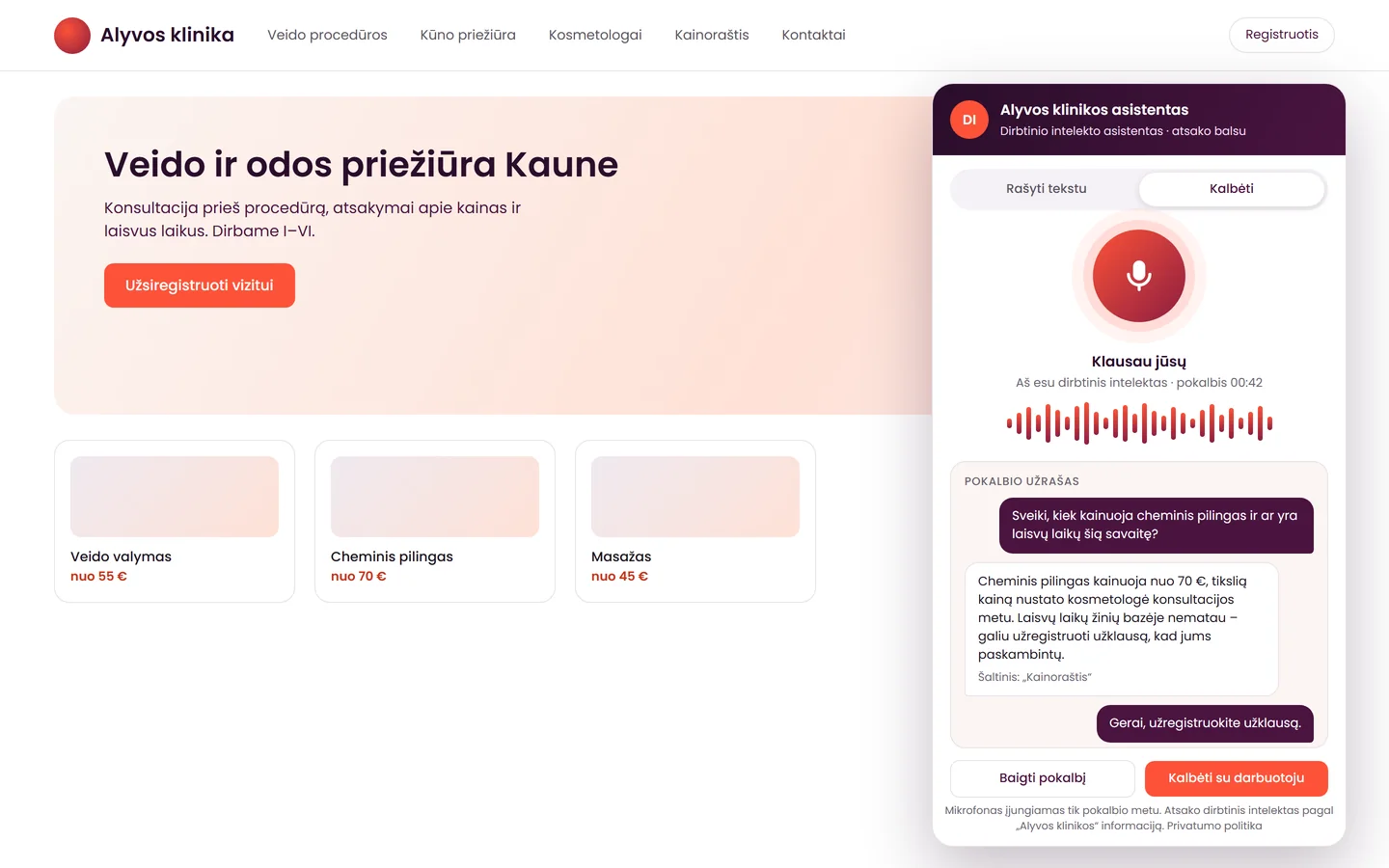
The visitor speaks – the assistant answers aloud
The voice window runs on your website and matches your colours. The assistant introduces itself as AI, a transcript of the conversation is shown on screen, and with the “Type instead” switch the visitor can move to text or ask for a member of staff at any time.
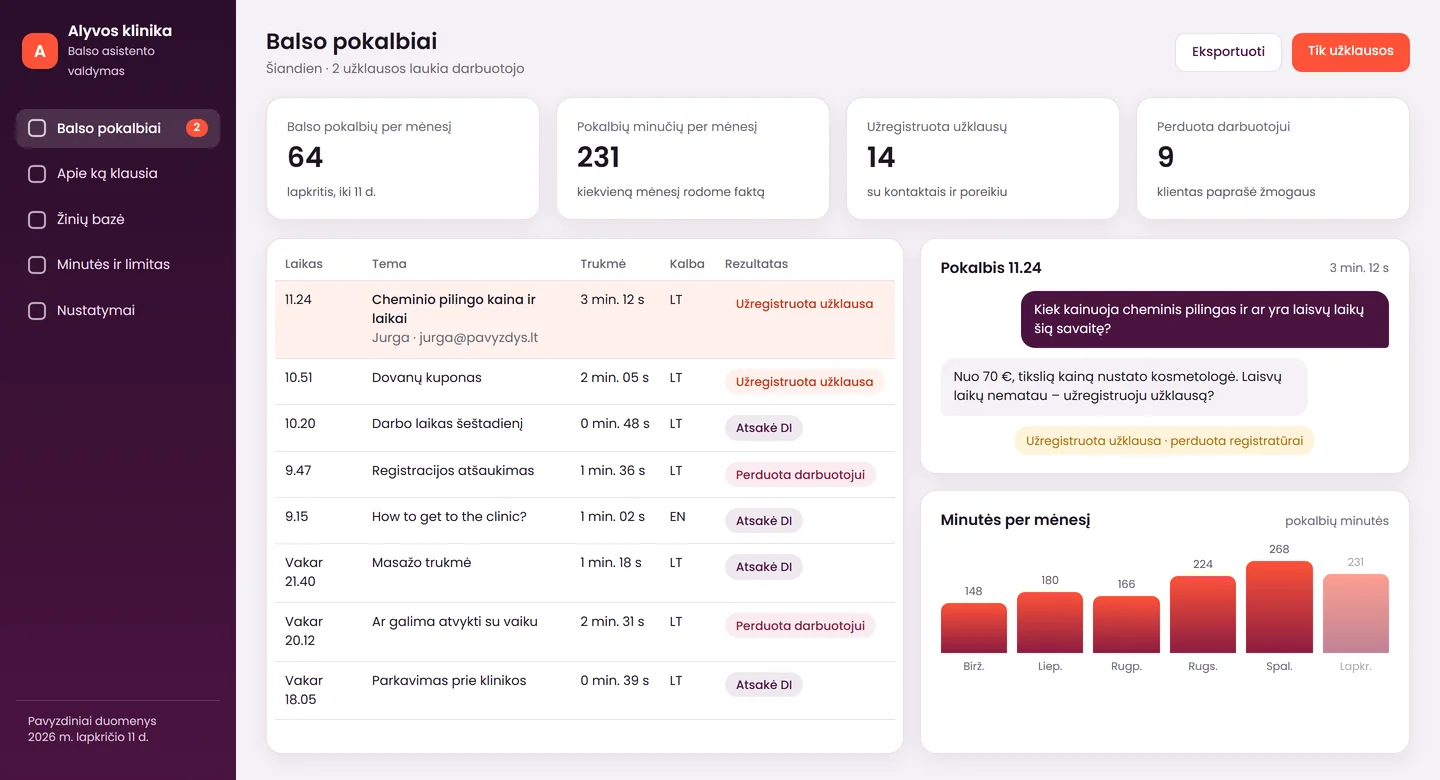
You see every conversation and the minutes
The list shows each conversation's duration, topic and outcome: answered by AI, enquiry registered or passed to staff. Alongside, you see the number of conversations and minutes per month.
The screens show a product mock-up: one of the possible versions, with sample data from the fictional “Alyvos klinika”. The figures are not a promise of results. We adapt the window and the dashboard to each client – to their colours, language and processes. The screens show a Lithuanian interface; yours can be in the language you need.
Advantages
How this solution differs from typical ones
Many offer a “talking robot”, but our differences lie elsewhere.
One assistant – two ways to use it
Voice and text use the same knowledge base, so the answers do not differ, and you update the data in one place.
We test Lithuanian with your phrases
Before launch, we listen to how the assistant pronounces and understands your service names, addresses and numbers, and we correct whatever sounds inaccurate.
You see whether visitors use voice
We count voice conversations and minutes and show them to you. That way you know whether the button pays off, instead of guessing.
Features
What the voice assistant can do
The main capabilities included in the add-on.
Voice conversation
- a “Talk” button in your colours; the microphone is switched on only during the conversation
- before the browser asks for the microphone, we explain why it is needed
- answers aloud from the same knowledge base as the text assistant
- a transcript of the conversation is shown on screen, and the “Type instead” switch lets the visitor move to text
- introduces itself as AI and can hand the conversation to a person at any time
Enquiries and reports
- collects contact details and the visitor's needs, and registers the enquiry
- shows a list of voice conversations: duration, topic and outcome
- counts conversations and minutes per month
- the knowledge base is expanded based on the conversations
- window texts can be prepared in any language you need
Honestly
What the voice assistant does not do, and what is worth knowing
Voice is not convenient for everyone or at every moment. It is better to know the limits in advance.
What it does
- answers aloud from your data and introduces itself as AI
- keeps the text window alongside, with the option to ask for a person
- registers the enquiry and passes it to you with the conversation transcript
What it does not do
- does not guarantee perfect Lithuanian: we check pronunciation with your phrases before launch, and there is sometimes a short pause before the first phrase
- works only with a microphone and the browser's permission, so the text window stays alongside; not every visitor will use voice, which is why we count conversations and minutes and show them to you
- does not recognise a person by their voice, and does not replace website accessibility tools or staff
Add-on to the AI assistant
Voice for the AI assistant
One add-on: a voice button for your AI assistant. Conversation minutes are charged by actual usage.
Voice for the AI assistant
from€290
If you already have an AI assistant, or plan to get one, and want visitors to be able to talk.
Included5
- a voice button in your colours
- the same knowledge base as in the text assistant
- AI labelling in the conversation window
- a text alternative alongside
- checks on phones and computers
Not included3
- the AI assistant itself – it is needed separately; price – from €290
- conversation minutes are charged by actual usage – 0,€25/min.
- integrations with a CRM or other systems – price after assessment
Prices are final – no VAT is charged. The voice add-on requires an AI customer service assistant (from €290). Conversation minutes are charged by actual usage, 0,€25/min. The exact amount and the monthly cap go into the contract.
After launch
What happens after launch
The voice assistant is maintained together with the text one: the same assistant, the same knowledge base.
Basic support
from €29/month
To keep the assistant running: server, backups, uptime monitoring and knowledge base updates. Voice minute costs are charged as incurred, with a cap.
Support
€129/month
Everything in “Basic support”, plus a monthly check of the answers, a monthly report and up to 2 hours of changes.
We work on working days (Mon–Fri). Changes beyond the hours included are charged at €50/hour.
Launch
From the first conversation to a working voice button
- Free assessment1–2 working days
We discuss whether you already have an AI assistant, what language and which phrases your customers speak, and where enquiries should end up.
- Voice check with your phrasesdepends on the project
We choose a voice, enter your service names, addresses and numbers, and listen to how the assistant pronounces and understands them. We correct it until it sounds right.
- Launch on your website1 working day
We add the button, check it on phones and in browsers, and show you how to review conversations and minutes.
Languages
It speaks the customer's language
The system and AI work in several languages. We can prepare the interface in any language you need, not only Lithuanian, Russian or English. We check the voice quality of each language separately before launch.
- an answer from the knowledge base in the customer's language
- window labels and buttons – in the language you choose
- we check the language quality before launch
Together
What else can connect to the voice assistant
Voice is an add-on to the AI assistant, and later the same assistant can also be connected to a phone line.
AI assistant in text
The foundation of the voice add-on: the same assistant and the same knowledge base when the visitor types.
AI phone receptionist
If visitors want to talk more often, the same assistant can be connected to a phone number.
Enquiries into a CRM
Enquiries collected by voice can go into your client and order management system.
Data and law
Voice and conversation data
Briefly and simply: what the microphone does and what happens to the conversation.
Microphone
The microphone is switched on only when the visitor clicks “Talk” and allows the browser to use it.
AI labelling
At the start of the conversation and in the window, it is stated that the visitor is talking to an AI (Regulation (EU) 2024/1689). We do not recognise a person by their voice.
Where it is processed
We name the voice-processing provider and the data location before set-up. Conversation transcripts and contact details are stored under the agreed terms.
Retention period
We agree the retention period with you, and we add a corresponding paragraph to your privacy policy. This is not legal advice. We can delete a conversation on request.
Tell us about your website – we will assess it free of charge
Tell us whether you already have an AI assistant and which languages your customers speak. Within 1 working day we will tell you whether voice suits you, what it will cost and how long it will take.
FAQ
Frequently asked questions
How does a voice assistant on a website differ from a chatbot?
A chatbot answers in writing, while a voice assistant answers aloud: the visitor clicks “Talk” and asks through the microphone. In our solution it is the same AI assistant with the same knowledge base, and the text window stays alongside.
How much does a voice assistant for a website cost?
The voice add-on to the AI assistant costs from €290. The AI assistant itself needs a separate package (from €290), and conversation minutes are charged by actual usage – 0,€25/min. No VAT is charged.
Does the voice assistant speak Lithuanian well?
We do not promise the quality of the Lithuanian in advance: it depends on the topic, names, addresses and the customer's pronunciation. Before launch, we test with your phrases and say openly if anything sounds inaccurate. There is sometimes a short pause before the first phrase.
Does the visitor have to allow the microphone, and does it work on a phone?
Yes, voice needs a microphone and the browser's permission, and the page must be served over HTTPS. Before the browser asks, we explain why the microphone is needed. Before launch, we test the most popular browsers on phones and computers, and the text window remains for those who do not allow the microphone.
Will the visitor know they are talking to AI, and what happens to their voice?
Yes: the assistant introduces itself as AI and there is a corresponding label in the window, and we do not recognise a person by their voice. How the conversation is handled and how long it is stored is described in the privacy policy; we agree the retention period with you. This is not legal advice.
Enquiry
Get a proposal for the voice assistant within 1 working day
Tell us your website address and whether you already have an AI assistant. Tel. +370 670 99265.
+370 670 99265Mon–Fri 9:00–18:00
info@saitai.ltWe reply within 1 working day
Alaušo g. 1C, LT-08424 VilniusMeetings by prior arrangement by phone only