What features does an online store need? A checklist for launch and growth
From day one, an online store needs six groups of features: a catalogue with filters and search, a detailed product page, a short checkout, online payments, delivery to parcel lockers and order management. Complex discount rules, prices for business customers, a connection to accounting software, multiple languages or a loyalty programme can often be added later, once it becomes clear what your customers actually need.
The essential features are the ones without which a customer can't find a product, pay for it and receive it – and you can't fulfil the order. The rest help you sell more or save time. You can use the table when writing a brief for your developer or comparing quotes.
Feature
Why you need it
When
Categories and filters
So customers can quickly narrow down the choice
essential
Search
For people who know the product name or code
essential once you have more than a few dozen products
Product variants and stock levels
So you don't sell what isn't in stock
essential
Guest checkout
Fewer abandoned baskets
essential
Online payments
Immediate payment and automatic order status
essential
Parcel lockers and courier
Delivery method and cost visible in the basket
essential
Order management and emails
Statuses, notifications for the customer and for you
essential
Terms of sale, privacy and cookie policy
Legal requirements and the payment provider's check
essential
Discount codes and promotions
For campaigns and newsletters
simple codes at first, more complex rules later
Shipping labels in the admin panel
When your daily shipments grow
later
Connection to accounting software
When your accountant can no longer keep up with transferring orders
later, or straight away if you have many orders
Prices for business customers
For wholesalers and partners
only if you sell to companies
The Start package for a Saitai.lt WooCommerce store (from €999) includes one payment provider, one courier with parcel lockers, and filters. The Business package (from €1,690) adds a second payment gateway and 2–3 couriers with shipping labels, and the Premium package (from €2,900) adds a connection to accounting software, B2B prices and multiple languages. We describe the steps from idea to launch in our article ‘How to create an online store’.
Product catalogue, search and filters
In a well-organised catalogue, a customer reaches the product they need in two or three clicks: category, a few filters, product list. So before development starts, it's worth agreeing on which properties (attributes) you'll use to describe your products – these are later used to build the filters.
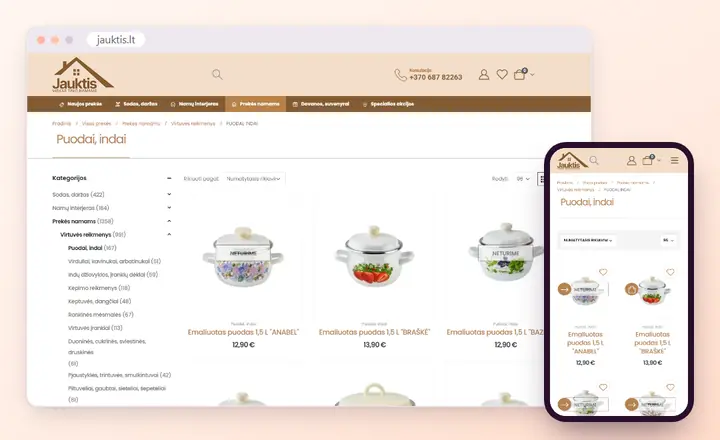
A category page in the Jauktis.lt online store: a category tree with product counts and sorting; on a phone, products are shown in two columns. View the project
Categories and subcategories. The same product can appear in several categories, e.g. ‘Children's shoes’ and ‘Sale’, but have one main URL.
Attributes. Size, colour, material, power or compatibility are entered the same way for every product: ‘red’ and ‘Red’ become two different values in the filter.
Filters. By price, brand, attributes and whether the product is in stock. On a phone, filters open in a separate panel so they don't take up space above the results.
Search. Finds a product by name and code, and shows suggestions as you type. Search with suggestions and typo tolerance is usually added with a separate plugin.
Supplier prices and stock levels can be updated automatically from XML or CSV files – see our page on product import and sync.
What should a product page include?
A product page should answer the questions a customer would ask a sales assistant in a physical shop: how much it costs, whether it's in stock, when it will arrive and how it differs from a similar product. The fewer unanswered questions, the fewer calls and returns.
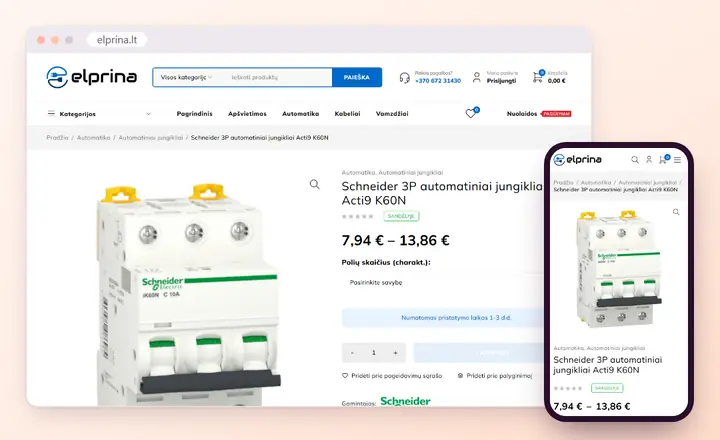
A product page in the Elprina online store: stock level, a price range by variant, variant selection and delivery time. View the project
Name, product code, price and clearly visible information on whether the product is in stock.
Variants (size, colour, pack), each with its own code, price, stock level and photo.
Several photos with zoom; so the page loads quickly, they're converted to WebP format.
A video, if the product is hard to understand from photos.
A specifications table instead of a long paragraph: dimensions, weight, material, composition.
Delivery time and cost, or a link to the delivery terms.
Related and complementary products, e.g. filters and descaler alongside a coffee machine.
A product page also needs Product structured data: price, currency, availability and, if available, the review rating. Based on this, Google can show the price and whether the product is in stock in its search results. How product and category pages are optimised is described on our page on e-commerce SEO.
Basket and checkout
Checkout must be short: the customer buys without registering, fills in only the essential fields and sees the final total including delivery before paying. Every extra step or unexpected charge at the last stage is a common reason for abandoning the basket.
Buying without an account. You can offer to create an account after the order rather than requiring one before purchase.
As few fields as possible. Name, phone, email and address or the chosen parcel locker. Company detail fields only appear when the customer ticks that they're buying for a company.
A clear total. The delivery cost and the free delivery threshold are shown already in the basket, not just at the last step.
Consents. A tick box for the terms of sale and a separate, unticked box for the newsletter.
Confirmation. The customer gets an email with the order details, and you get a notification about the new order.
The admin panel should show a list of orders with their statuses (awaiting payment, paid, shipped, returned), each customer's order history and order export. It's worth rewriting the customer emails in your own words rather than leaving the platform's standard texts.
Which payment methods should you connect?
To start with, one provider is enough – one that shows bank links and card payment in the basket and changes the order status itself once payment is received. In Lithuania, such services are offered by, for example, Paysera and Montonio. Other methods are worth adding depending on who your customers are.
Payment method
Who it suits
What to check
Bank links
Customers in Lithuania
Whether all the main banks are on the list
Payment cards, Apple Pay, Google Pay
Customers browsing on a phone, and customers from abroad
Whether these methods are enabled in your contract with the provider
Stripe, PayPal
Selling abroad
Currencies and the refund procedure
Bank transfer, pro forma invoice
Companies and large orders
Who marks the payment as received, and how quickly
Instalments or leasing
More expensive products
Whether your provider or a leasing company offers this service
Cash on delivery
Customers who want to pay when collecting the parcel
Whether your contract with the courier provides for it
There's also an important feature the customer doesn't see: refunds straight from the order, if the provider's module supports it. Connecting one provider costs from €150, and what this work includes is described on our page on payment gateway integration.
Delivery: parcel lockers and couriers
In the basket, the customer must be able to choose a parcel locker or courier and see the delivery cost straight away. In Lithuania, parcel locker and courier services are provided by Omniva, DPD, LP Express, Venipak and other carriers; which ones to offer depends on your contracts with them and the size of your products.
The parcel locker is chosen from a list or a map by city and street – easy to use on a phone too.
The delivery cost is calculated by weight, size, order total or country, and a free delivery threshold is set.
For large items, parcel lockers are switched off and only courier delivery is left.
If you have a shop or warehouse, the customer can collect the product themselves.
The shipping label and tracking number are created in the order, and a tracking link is sent to the customer.
When you're sending dozens of parcels a day, being able to print labels for several orders at once in the admin panel saves time. More on our page on shipping integration.
Discounts, coupons and prices for business customers
To start with, discount codes and sale prices with validity dates are usually enough. More complex rules – volume discounts, ‘3 for 2’ offers, separate prices for companies – are needed once you're already applying them when selling through other channels or working with partners.
Discount codes – as a percentage or a fixed amount; you can set a validity period, a minimum order value, a usage limit and categories.
Sale price – set in advance with a start and end date, so you don't have to change it by hand at midnight.
Volume discounts – a lower unit price when buying 5, 10 or more units.
Prices for business customers (B2B) – price groups, prices excluding VAT, the company code in the order and a pro forma invoice.
When announcing a price reduction, you must also state the previous price – the lowest price applied during the 30 days before the reduction. Lithuania has transposed this EU directive requirement into its Civil Code; it doesn't apply to, for example, perishable goods, and where the price is reduced progressively, the previous price is the price before the first reduction. So you don't have to calculate this by hand, the store should keep a price history and show the previous price automatically; in a WooCommerce store, a plugin is used for this.
Do you need to connect your store to your accounting software?
Not necessarily at the start. While there are only a few orders, your accountant can import them from an export file. A connection to accounting software pays off when your daily orders grow, you also sell elsewhere, and mismatched stock levels turn into products that have been sold but aren't actually in the warehouse.
The integration usually works in two directions: orders, invoices and customers go to the accounting system, and stock levels and prices go to the store. Saitai.lt integrates online stores with the most popular Lithuanian accounting software, e.g. Rivilė, B1.lt, Centas and Finvalda, provided the software has an API or an import option. Integration with accounting software costs from €490 – more on our page on accounting software integration.
Before ordering the integration, agree with your accountant where the master product and stock data will be kept: if the same data is edited in two places, it soon stops matching.
Which legal and technical elements must you not forget?
A store without terms of sale, cookie consent or backups isn't finished, however good it looks. Customers don't notice these elements straight away, so their absence usually comes to light when the payment provider checks the store, or when a dispute or a failure occurs.
Terms of sale with the seller's details, delivery and return conditions, and the 14-day right of withdrawal.
A privacy and cookie policy and a consent banner that doesn't set analytics or advertising cookies until the visitor agrees to them.
A return form or clear instructions on how to return a product.
Accessibility for people with disabilities: the European Accessibility Act has applied to e-commerce since 28 June 2025, except for microenterprises providing services (fewer than 10 employees and an annual turnover or balance sheet total of no more than €2 million).
An SSL certificate, so that every URL opens over the secure HTTPS protocol.
Backups that aren't kept on the same server, and someone who updates the system and plugins.
The content of the legal texts is provided by the owner or their lawyer, while the developer creates the pages, consent fields and banner for them. You'll find a more detailed list of requirements, with sources, in the article on creating an online store mentioned above.
What can be left for a later stage?
It's worth building later the features whose value you can only assess once you have data from the first few months. That way, the initial budget goes on what you couldn't sell without.
Reviews and ratings. An empty review section achieves nothing – switch it on once you have your first customers.
Loyalty programme and points. Makes sense once you have returning customers.
Multiple languages and currencies. When you're planning a specific foreign market and know how you'll deliver and handle returns there.
Marketplaces and price comparison websites. Exporting products to them once your catalogue is in good order.
Wishlist, product comparison, back-in-stock notifications. Useful for a large product range.
If your sales process is non-standard – rentals, bookings, a product configurator or contract prices for each customer – it's worth considering a custom Laravel online store.
Sources
Directive (EU) 2019/2161, known as the ‘Omnibus’ Directive (indication of the previous price): eur-lex.europa.eu
State Consumer Rights Protection Authority (VVTAT), ‘How to advertise a reduced product price correctly’ (in Lithuanian): vvtat.lrv.lt
Directive (EU) 2019/882, the European Accessibility Act (applies from 28 June 2025): eur-lex.europa.eu
Directive 2011/83/EU (the consumer's right to withdraw from a distance contract): eur-lex.europa.eu
Preparing a brief for your online store? Send us your feature list and an approximate number of products by filling in the enquiry form. We'll reply within 1 working day and tell you which features are essential from the start, which can wait, and how much the store would cost.
Does WooCommerce have all these features without plugins?
Not all of them. WooCommerce itself has a catalogue, product variants, stock levels, a basket, guest checkout, discount codes, shipping zones and reviews. Modules for Lithuanian payment and shipping providers are usually supplied by the providers themselves, while PDF invoices, B2B prices and volume discounts, showing the previous price or advanced search require plugins. We only install the essential ones – the fewer there are, the fewer conflicts during updates.
Can features be added later, once the store is live?
Yes. We build and test new features on a copy of the store, and only move them to the live store after checking that the basket and payments still work. Small jobs cost €30/hour, larger ones are quoted separately. The only thing worth thinking through in advance is the structure of your product data – attributes, variants and categories – because that's the hardest to change later.
Do customers have to register?
No, and we don't recommend requiring it. Most customers simply want to buy, so an order form with the essential fields is enough, and you can offer to create an account after the order. Registration makes sense when selling to companies, where a logged-in customer sees their own prices and order history and can repeat a previous order.
How much does an online store with payments and parcel lockers cost?
From €999. That's the price of the Start package for a WooCommerce store, with one payment provider, one courier with parcel lockers and up to 30 products entered. The Business package with two payment gateways, 2–3 couriers and a custom design costs from €1,690, and each additional payment or shipping provider integration costs from €150. Hosting is from €70/year (the first year is included in the Business package). Prices include all taxes – no VAT is added.
How do you manage stock levels if you also sell in a physical shop?
Stock should be counted in one system – usually your accounting or POS software – and the online store receives it from there. If the software has an API or an export option, stock levels and prices can be updated automatically on a schedule, and orders from the store then reduce the stock in the same software. We assess how often and in which direction data should be exchanged based on your software.
To appear in ChatGPT answers and Google's AI Overviews, your website must be indexed by Google and Bing and reachable by AI search crawlers, and your most important…
Website development runs in 7 stages: enquiry and call, brief and quote, contract and deposit, design, development, content, then testing and launch. Saitai.lt…
A CRM system (Customer Relationship Management) is software that keeps your customer contacts, enquiries, quotes, orders, tasks and the full history of every…