How to check your website's SEO yourself: a 30-point checklist
You can check the SEO of a small website yourself in a few hours with free tools: Google Search Console shows whether your pages are getting into the index, PageSpeed Insights whether your website is fast enough, and a website crawler finds errors in titles, headings, links and redirects. Below you'll find what to check at each step, plus a 30-point checklist with priorities.
Five free tools are enough for a basic SEO check: Google Search Console, Bing Webmaster Tools, PageSpeed Insights, the free version of the Screaming Frog SEO Spider crawler and Google's Rich Results Test.
Tool
What it shows
Price
Google Search Console
whether pages are indexed, which queries your website appears for, impressions, clicks, Core Web Vitals data, any manual actions applied by Google
free
Bing Webmaster Tools
indexing and errors in Bing search, which Copilot also relies on; IndexNow notifications
free
PageSpeed Insights
loading speed and Core Web Vitals metrics: real-user data and lab data (Lighthouse)
free
Screaming Frog SEO Spider
crawls your website the way a search engine bot does: titles, descriptions, headings, 404 errors, redirects, canonical URLs
free for up to 500 URLs; a licence costs €245/year (as of September 2026)
Rich Results Test
structured data errors and warnings
free
If your website isn't connected to Search Console yet, start there: verification takes a few minutes, but data only starts building up from the day you connect.
Can Google see your pages?
First, make sure your most important pages are in Google's index – until they are, no other fixes will help. The Page indexing report in Search Console shows how many pages are indexed and why the others have been left out.
Six indexing checks – each is described in the list below.
URL Inspection. Check your home page and your 3–5 most important service or category pages: are they indexed, and which version does Google treat as the main one?
robots.txt. Open yourwebsite.lt/robots.txt and review the ‘Disallow’ lines: they mustn't block important sections, or CSS and JavaScript files.
The ‘noindex’ tag. It's often left switched on after the development stage – the website then works, but doesn't appear in search.
Sitemap. The sitemap.xml file must be submitted to Search Console and Bing Webmaster Tools, and it should only contain working, indexable URLs.
Canonical URLs. The rel="canonical" tag must point to the main version of the page – not, for example, to the home page on every page.
Duplicates. Your website must open at a single address: only over secure HTTPS, either with or without ‘www’, and in one variant – with or without a trailing slash. Other versions must lead to the main one with a 301 redirect.
Are your titles and meta descriptions right?
Every indexable page needs a unique title and meta description that clearly say what's on the page. Google sometimes rewrites them, but it more often shows accurate titles and descriptions that match the content unchanged.
Title – up to about 60 characters so it isn't cut off in search results; the most important words at the start, the company name at the end.
Description – about 140–155 characters with a concrete benefit: a ‘from’ price, a timeframe or what makes your offer stand out.
Uniqueness. Screaming Frog shows duplicate, overlong and empty titles and descriptions.
You don't need ‘meta keywords’. Google announced back in 2009 that it doesn't use this tag, so there's no point filling it in.
Is your heading and content structure right?
It's recommended to have one H1 heading per page that matches its topic, and to use H2 and H3 headings to break the text into logical sections. Even more important than the headings is whether the page answers the question the person found it with.
One H1 heading that matches what people search for, e.g. ‘Accounting services in Kaunas’ rather than ‘Welcome’.
H2 headings as customers' questions: ‘How much does … cost?’, ‘How long does … take?’.
A direct answer in the first paragraph, details after it.
One page per need. In the Search Console Performance report, check whether several of your pages are taking turns to appear for the same query – that way they compete with each other.
Service pages of just a few sentences, with no price, timeframe or examples, are a common weak spot both for search and for customers.
Is your website fast and easy to use on a phone?
Assess speed using the Core Web Vitals metrics, measured on real visitors' devices: it's good when, for 75% of visits, LCP doesn't exceed 2.5 s, INP 200 ms and CLS 0.1. In 2024, INP replaced the earlier FID metric.
Core Web Vitals thresholds – more detail in the table below.
Metric
What it measures
Good result
LCP (Largest Contentful Paint)
how long it takes to display the largest visible element, usually the main image or heading
up to 2.5 s
INP (Interaction to Next Paint)
how quickly the page responds to a click, tap or key press
up to 200 ms
CLS (Cumulative Layout Shift)
whether content jumps around while the page loads
up to 0.1
Check the mobile version first – Google indexes the mobile version of pages.
PageSpeed Insights separates real-user data from the lab test. Websites with little traffic may have no real-user data – in that case, rely on the lab result.
The most common causes of slowness: oversized images, too many plugins, slow hosting and third-party scripts (chat widgets, tracking codes).
Check on a phone yourself: can you read the text without zooming, are the buttons too close together, and does a pop-up cover the content?
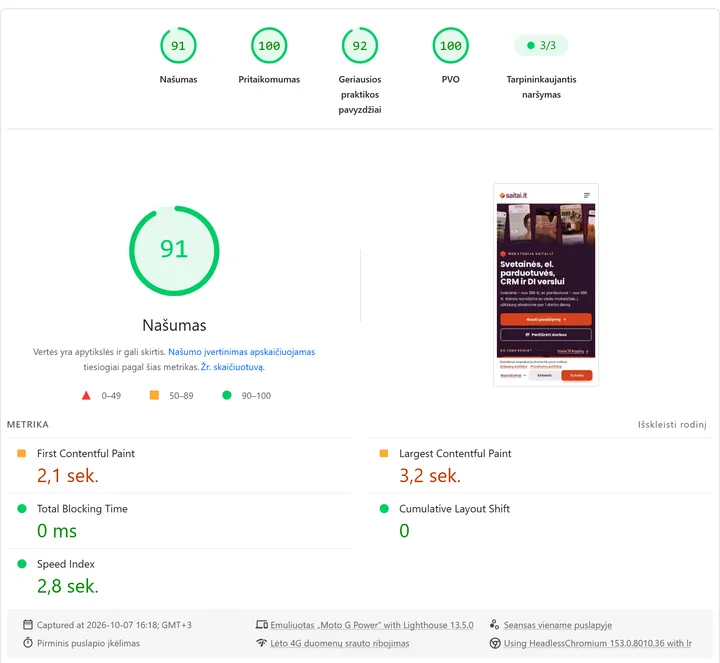
A PageSpeed Insights test of the saitai.lt home page on mobile (lab data, 7 October 2026): performance 91 out of 100. LCP (3.2 s) still exceeds the 2.5 s threshold, so look not only at the overall score but at each metric.
Are your links, URLs and redirects in order?
Internal links must lead to working pages without intermediate redirects, and every important page must be reachable within a few clicks of the home page. The quickest way to find such errors is to crawl the website.
404 errors. Fix the link or redirect the old URL to a suitable page.
Redirect chains. If URL A leads to B and B leads to C, redirect A straight to C and fix the internal links.
Depth. Important pages must be reachable in no more than 3 clicks from the home page.
Link text. Descriptive (‘SEO audit price’), not ‘click here’.
URLs. Short, readable, lower case, with hyphens between words, no spaces and no Lithuanian characters.
Orphan pages. If no internal link points to a page, both bots and visitors will struggle to find it.
Are your images optimised?
Images are often the heaviest part of a page. Every content image should have meaningful alternative text, be in a modern format and be no larger than it's displayed on screen.
Alternative text (alt) describes what's in the image, e.g. ‘White kitchen cabinets with an oak worktop’. A list of keywords doesn't belong here, and decorative images are given an empty alt="".
Format and size. WebP or AVIF; a 4,000-pixel-wide photo in an 800-pixel-wide slot is just dead weight.
Dimensions. The width and height attributes reserve space and stop content from jumping around (reducing CLS).
Lazy loading. loading="lazy" suits images below the first screen, but not the main hero image at the top – that must load straight away.
Do you have structured data?
Structured data (schema.org markup, usually in JSON-LD format) helps Google understand what your company, product or article is. Check it with the Rich Results Test and in the Search Console reports.
Organization or LocalBusiness – company name, address, contact details;
BreadcrumbList – the breadcrumb trail;
Product with price and availability (whether the product is in stock) – for online store products;
Article – for articles.
The most important rule: mark up only what's visible on the page. In 2023, Google restricted FAQ rich results to government and health websites, and in May 2026 it stopped showing them altogether. So FAQPage markup will no longer produce expandable questions in search results, although the FAQ section itself remains useful to visitors on the page.
The 30-point checklist
All the points in one table. High priority means the error can stop a page from getting into search or drive visitors away, so fix it first.
No.
What to check
How to check it
Tool
Priority
1
Your most important pages are indexed
URL Inspection for the home page and your 3–5 most important pages
Search Console
high
2
robots.txt doesn't block important sections, CSS or JS
open /robots.txt and review the ‘Disallow’ lines
browser
high
3
Important pages have no ‘noindex’
the ‘Indexability’ column
Screaming Frog
high
4
One version of the website (HTTPS, with or without ‘www’)
open the 4 variants of the address – all must lead to the same one
browser
high
5
sitemap.xml submitted and error-free
Sitemaps report
Search Console, Bing Webmaster Tools
medium
6
Canonical URLs point to the main version
the ‘Canonical Link Element’ column
Screaming Frog
medium
7
No duplicates caused by filters and parameters
duplicate-related reasons in the indexing report
Search Console
medium
8
Website verified in Bing
verification and a submitted sitemap
Bing Webmaster Tools
low
9
Every page has a unique title
‘Page Titles’ tab: missing and duplicate
Screaming Frog
high
10
Titles up to ~60 characters, most important words first
the ‘over length’ titles filter
Screaming Frog
medium
11
Unique descriptions (~140–155 characters)
‘Meta Description’ tab
Screaming Frog
medium
12
One H1 that matches the page topic
‘H1’ tab: missing and multiple
Screaming Frog
medium
13
H2–H3 reflect the sections of the content
review your 5 most important pages
browser
low
14
The first paragraph answers the main question
read the top of the page through a customer's eyes
browser
medium
15
One page per query
queries for which several of your pages are shown
Search Console (Performance)
medium
16
Service pages include price, timeframe and contact details
review every service page
browser
medium
17
No very short or near-identical pages
word count and the near-duplicates report
Screaming Frog
medium
18
LCP up to 2.5 s on mobile
the mobile result
PageSpeed Insights
high
19
INP up to 200 ms
real-user data
PageSpeed Insights, Search Console
medium
20
CLS up to 0.1
real-user and lab data
PageSpeed Insights
medium
21
Easy to use on a phone: text, buttons, pop-ups
open your most important pages on your own phone
phone
high
22
HTTPS on every page, no mixed content
browser warnings, ‘http://’ resources
browser, Screaming Frog
high
23
No internal links to 404 pages
‘Response Codes’ → client errors (4xx)
Screaming Frog
high
24
Redirects without chains
the redirect chains report
Screaming Frog
medium
25
Important pages no more than 3 clicks from the home page
the ‘Crawl Depth’ column
Screaming Frog
medium
26
Descriptive link text
the list of link texts (‘Anchor Text’)
Screaming Frog
low
27
Clear, short URLs
review the list of crawled URLs
Screaming Frog
low
28
Content images have meaningful alt text
‘Images’ tab: missing alt text
Screaming Frog
medium
29
Images in WebP or AVIF, correctly sized, with width and height
recommendations on images and CLS
PageSpeed Insights
medium
30
Structured data without errors
check your home page, a service or product page and an article page
Rich Results Test, Search Console
low
What should you do with the results?
Fix things in order of priority: first the errors that stop pages from getting into the index or prevent visitors from using the website comfortably, then titles, content and speed, and finally the minor details.
List the problems you've found in a table: what isn't working, where (example URLs), the priority and who will fix it.
Fix the high-priority errors first and mark them as fixed in the Search Console report – Google will recheck the pages.
After 4–6 weeks, compare impressions and clicks with the period before the fixes.
Repeat the whole checklist every six months, and always after major changes: a new design, a website migration, a content management system (CMS) update.
A full SEO audit is worth ordering when your search traffic has dropped and you can't find the cause, when you're preparing to migrate your website, when you have an online store with hundreds of pages, or when you don't know how to fix the errors you've found. A Saitai.lt SEO audit costs from €49 for a small website and from €99 for an online store or catalogue, and is completed within 5–10 working days of receiving access. If you order monthly SEO within 1 month of the audit, the cost of the audit is credited towards the first month's fee (all prices are on our SEO pricing page; prices include all taxes – no VAT is added).
For stores with lots of categories, filters and product pages, there's a separate e-commerce SEO service. If you don't want to handle regular technical checks, updates and backups yourself, you can order our website maintenance and support service. To check how ready you are for AI search – bot access, text that doesn't depend on JavaScript, mentions – see our article ‘How to get into ChatGPT and Google AI answers’, and we explain how search works and how technical, on-page and off-page SEO differ in our article ‘What is SEO and how does it work?’.
Screaming Frog SEO Spider (free version limit and licence price): screamingfrog.co.uk
Done the check but not sure where to start fixing? Fill in the enquiry form: give us your website address and a few points you're unsure about. We'll reply within 1 working day, and within 1–2 working days we'll send you a free initial assessment – which errors matter most and whether you need a full audit.
How often should you check your Search Console reports?
A quick look every month is worthwhile: has the number of indexed pages dropped, have any new errors appeared, and how are clicks changing? Going through the full 30-point checklist every six months is enough, as well as after every major change – a new design, a move to another server or a CMS update. Search Console also notifies you of serious errors by email.
Are free tools enough?
For a small website – usually, yes. The free version of Screaming Frog crawls up to 500 URLs, and Search Console and PageSpeed Insights are completely free. Paid tools are needed for large websites and for competitor and backlink analysis, but the most important thing isn't the tool – it's knowing which errors are actually holding you back.
Do you still need an SEO specialist after the check?
Not always. If you've found a few clear errors, such as duplicate titles or oversized images, you can fix them yourself. You need a specialist when the cause of the errors isn't clear, when fixing them means changing the website's code or redirects, or when you want to keep growing your traffic – that's no longer a check but ongoing SEO work.
How much does a full SEO audit cost?
A Saitai.lt SEO audit costs from €49 for a small website and from €99 for an online store or catalogue, because categories, filters and product pages need to be checked. The audit is completed within 5–10 working days, and if you order monthly SEO within 1 month of the audit, its cost is credited towards the first month's fee. Prices include all taxes – no VAT is added.
To appear in ChatGPT answers and Google's AI Overviews, your website must be indexed by Google and Bing and reachable by AI search crawlers, and your most important…
Website development runs in 7 stages: enquiry and call, brief and quote, contract and deposit, design, development, content, then testing and launch. Saitai.lt…
A CRM system (Customer Relationship Management) is software that keeps your customer contacts, enquiries, quotes, orders, tasks and the full history of every…