What is a content management system and how to choose one – WordPress, Joomla or Laravel
A content management system (CMS) is software that lets you change your website's text, photos, pages and menus yourself in a browser, without any coding. WordPress or Joomla suits most company websites, website builders are good for a quick, simple start, and for non-standard processes there's a custom system built on the Laravel framework.
A content management system has two parts: the admin area, which you log into with a password, and the public website that visitors see. Text, photos and settings are stored in a database, and the design in a separate template (theme). So when you change a price or add a news item, the website updates immediately while the design stays the same.
Without a CMS, every change would have to be made in the code by a developer. According to W3Techs (27 September 2026), WordPress is used by 40.2% of all websites worldwide, Wix by 4.2% and Joomla by 1.1%, while 31.5% of websites use no known CMS: they are static or run on custom systems.
What should a good CMS be able to do?
A good CMS lets you change text, photos, pages, menus and search-relevant fields without a developer, limits what each user can change, and lets you update the system safely. Before choosing, it's worth checking these capabilities:
Editing. A visual editor in which text looks much as it will on the website, and the option to save a draft before publishing.
Pages and menus. A new page can be created and added to the menu without changing the template.
SEO fields. Page title, description, URL, 301 redirects, sitemap.
User roles and permissions. For example, a sales manager can publish news but can't change the settings.
Revisions. The ability to see who changed a page and when, and to restore an earlier version.
Multiple languages. Language versions are linked to each other, and a visitor can switch language on the same page.
Updates and backups. A clear update process and the ability to restore the website quickly.
Data export. Content can be exported and moved to another system.
Who is WordPress for?
WordPress suits most company websites, blogs and online stores: it's free, has the widest choice of themes and plugins, and specialists who know it are the easiest to find. Install the free WooCommerce plugin and the website becomes an online store.
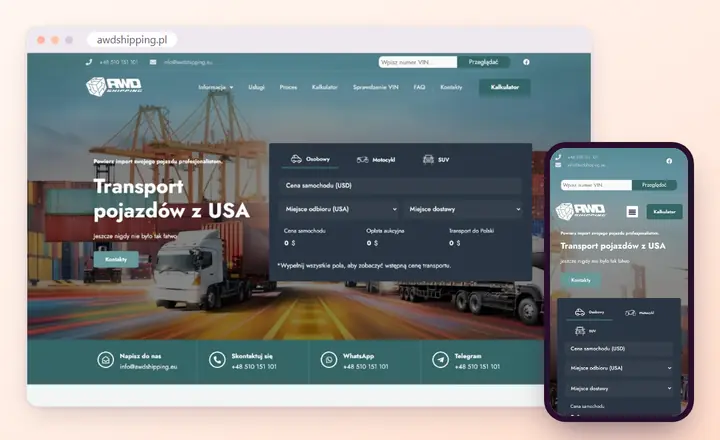
A WordPress example: the AWDshipping website, built by Saitai.lt. View the project
Since 2018 (version 5.0), WordPress has had a block editor in which pages are put together from headings, text, images and other blocks. A multilingual website needs a plugin, because this feature isn't built into the core.
WordPress's greatest strength – plugins – is also its main risk. According to the Patchstack report, 11,334 new vulnerabilities were found in the WordPress ecosystem in 2025: 91% of them in plugins, 9% in themes and only 6 in the core itself. That's why it's important to use only plugins you need that are actively maintained, and to update them regularly. More on how we build on our page about WordPress website development.
Who is Joomla for?
Joomla suits websites that need multiple languages, detailed user permissions and structured content without extra extensions: these features are built into the system itself. It's also free and open source, but there's a smaller choice of specialists and extensions than with WordPress.
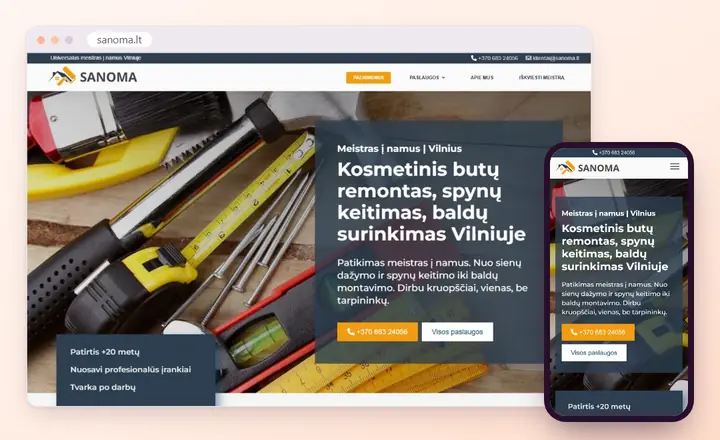
A Joomla example: the Sanoma website, built by Saitai.lt. View the project
Multiple languages – language versions and the links between them work without extra extensions.
Access permissions – you can set who sees and edits what, down to an individual category or item.
Custom fields – you can add your own fields to articles, categories and users, e.g. a price, a date or a gallery.
Automatic updates – from versions 5.4 and 6.0, the core can be updated automatically.
Joomla 6.0 was released on 14 October 2025. Joomla 5 will receive security fixes until 12 October 2027, so websites on older versions should plan a migration. For online stores, Joomla most often uses the VirtueMart extension. The Saitai.lt website itself also runs on Joomla.
Where do website builders hit their limits?
A website builder such as Wix or Squarespace is a rented platform: the system, hosting and templates are included in a monthly fee, and you can put a website together in a few days. That's convenient as long as you need a simple brochure website and don't want to deal with updates.
The limits become clear later. You can only use the features the platform and its app store offer; you can't move the website to other hosting with its full design, and the only way out is to rebuild the website on another system. On top of that, you keep paying the fee for as long as the website is live, so it's worth calculating the cost over at least 3–5 years.
When is a custom system (Laravel) worth it?
A custom system is worth choosing when your website is not just a shop window but a working tool: orders follow a non-standard path, prices are calculated by your own rules, or you need customer accounts, integrations with accounting software or an internal CRM. Laravel is not a CMS but a PHP development framework used to build such a system around your process.
Pros: the admin area has only the fields and buttons your staff need; there aren't dozens of third-party plugins; there's no per-user fee.
Cons: development takes longer and costs more, and every new feature has to be developed. The team that built the system knows it best, so code handover and documentation are worth covering in the contract.
Saitai.lt has its own CMS built on Laravel: we use it to build custom online stores (from €2,900, usually from 6 weeks). We develop other systems after assessing the brief – more on our page about Laravel development.
WordPress, Joomla, a website builder or Laravel: comparison table
In short: WordPress is the all-round choice for most websites and online stores, Joomla suits multilingual websites with more complex permissions, a website builder is for a quick, simple start, and a custom Laravel system is for non-standard processes and integrations.
Content management systems compared
Criterion
WordPress
Joomla
Website builder (e.g. Wix)
Custom (Laravel)
Licence
free, open source
free, open source
monthly fee
no licence fee; you pay for development
Editing
block editor, easy to learn
more detailed admin area
visual, the simplest
only the fields you need
Extending
thousands of plugins
fewer extensions
only the features the platform offers
anything, but it has to be developed
Multiple languages
needs a plugin
built in
depends on the platform
as required
Security
most risk lies in plugins; updates are essential
updates are essential
handled by the platform
depends on the developer and maintenance
Hosting and data
any PHP hosting
any PHP hosting
only on the platform's servers
our hosting, a virtual private server (VPS) or your own server
Vendor lock-in
low – plenty of specialists
medium
high – tied to the platform
higher – tied to the developer
Best for
a company website, blog or online store
a multilingual website, catalogue or portal
a simple brochure website
a system built around your business logic
Saitai.lt builds websites on WordPress and Joomla – a business website costs from €499 and takes 10–25 working days (you'll find all the packages on our page about website development for businesses). We don't build websites on website builders, but we do rebuild websites made with them on other systems.
Do you need a page builder?
A page builder is a CMS plugin that lets you lay out pages from sections and columns by dragging elements with the mouse. WordPress has its own block editor, and popular add-on builders include Elementor and SP Page Builder (for Joomla). A page builder is useful if you often create new pages with different layouts yourself.
It comes at a price, though. A page builder generates more HTML, so the page may load more slowly, and if you switch the builder off, the content often falls apart and has to be rebuilt. With sections rearranged freely, the design gradually becomes inconsistent. If you mostly update content rather than create new layouts, pre-agreed page templates where you only change the text and photos are often more convenient.
What should you ask a developer before choosing a CMS?
Before signing a contract, find out not only which system the website will be built on, but also who will maintain it, who will own the logins and whether you can move to another developer. These questions will help you compare quotes:
Why are you recommending this particular CMS for my website?
Which paid plugins or themes will you use, and who will pay for their licences later?
Who will update the system, how often, and how much will it cost?
Will I get administrator access, the files and the database?
Will I be able to create new pages myself, or only edit existing ones?
How are backups made, and how quickly can the website be restored?
What will I need to do if I later want to change developer or system?
Not sure which system to choose? In the enquiry form, tell us what kind of website you need, who will update it and whether you plan to sell online. Within 1 working day we'll tell you which CMS fits and how much the website will cost.
Will I be able to change the text and photos myself?
Yes. That's exactly what a content management system is for: you change text, photos, prices and news in your browser, without any coding. When the Saitai.lt team builds your website, we show you how to manage it – training is included in the price. Bigger changes, such as a new page layout or feature, usually need a developer.
Can I change the CMS later?
Yes, but it almost always means rebuilding the website. Text, photos and some data, such as products or users, can be migrated, while the design and features have to be implemented again. 301 redirects are set up for the old page URLs so you don't lose visitors from search. Saitai.lt moves a website to a new CMS in 10–25 working days.
Are WordPress and Joomla free?
The systems themselves are free – they're open-source software that you can use and modify without a licence fee. You pay for hosting, the domain, any paid themes or plugins you need, and maintenance. Saitai.lt website hosting costs from €60/year, and maintenance from €29/month.
Which content management system is the most secure?
Security depends more on maintenance than on the system itself. WordPress is attacked most often because it's the most popular, but most vulnerabilities are found in plugins, not the core. Any CMS is only as secure as it is regularly updated, with few unnecessary plugins, strong passwords and backups.
To appear in ChatGPT answers and Google's AI Overviews, your website must be indexed by Google and Bing and reachable by AI search crawlers, and your most important…
Website development runs in 7 stages: enquiry and call, brief and quote, contract and deposit, design, development, content, then testing and launch. Saitai.lt…
A CRM system (Customer Relationship Management) is software that keeps your customer contacts, enquiries, quotes, orders, tasks and the full history of every…